Infinite Canvas
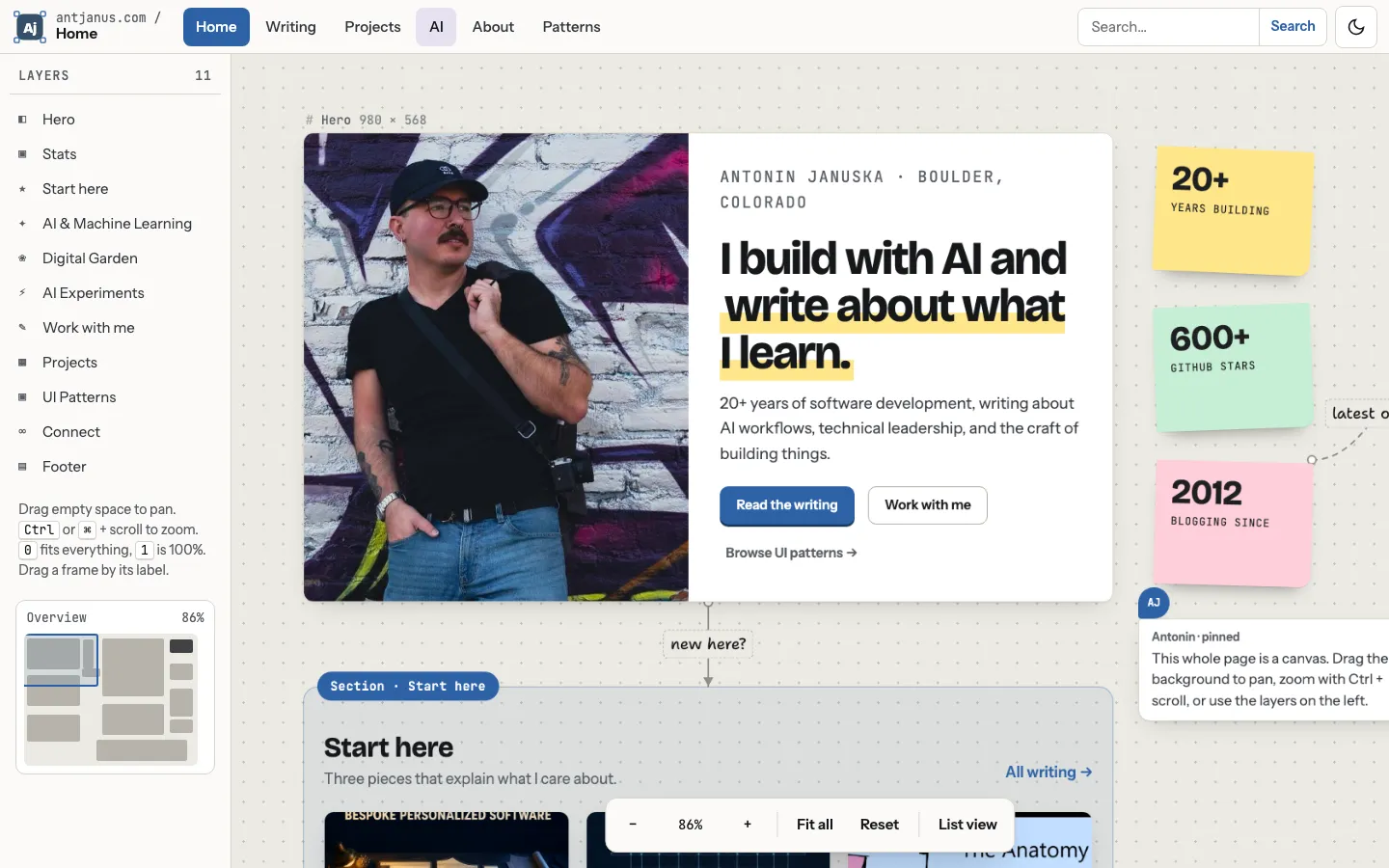
A home page laid out as a design-tool board: a Layers rail with a minimap, a dotted pan-and-zoom canvas holding a framed hero labelled with its pixel dimensions, sticky-note stats, a pinned comment, hand-lettered connector wires and a floating zoom toolbar.
Paste this into an agent to rebuild the whole page from scratch.
Build a personal home page that opens as an infinite canvas in the style of a design tool such as Figma or tldraw. Every block of content is an object on a dotted board: plain frames carry a monospace dimension label, grouped content sits inside tinted sections with coloured tabs, stats are sticky notes, and hand-lettered wires connect related frames. The reader pans and zooms around the site instead of scrolling it.
Use three fixed layers of chrome around the board. A 56px top toolbar holds a logo mark (a slate rounded square reading `Aj` with four small selection handles at its corners) beside a breadcrumb `antjanus.com / Home`, a row of page tabs (the current one filled slate-blue, the AI tab tinted lavender), search and a theme toggle. A 240px Layers rail on the left lists every frame on the page with a small glyph, keyboard hints for pan and zoom, and a minimap at the bottom that shows each frame as a grey block and the current viewport as a blue outline. A floating pill dock at the bottom centre holds zoom out, a live percentage, zoom in, `Fit all`, `Reset` and `List view`. The board fills the rest. Place every frame absolutely with `--x`, `--y` and `--w` custom properties inside a `.world` element, roughly: the hero at (60, 90) 980px wide, the stats column to its right, Start here below the hero, the AI section in a second column at x 1440, the Digital Garden below it, Experiments at the bottom left, and a third column of 440px frames (Work with me, Projects, UI pattern library, Connect) at x 2680, with a wide footer frame along the bottom.
Set headings in **Bricolage Grotesque** at weight 800 with tight tracking, body and UI in **Instrument Sans** at 18px, frame labels, metadata and eyebrows in **JetBrains Mono**, and only sticky notes and wire labels in **Shantell Sans**. Highlight the second half of the hero headline with a butter-yellow marker underline drawn as a `linear-gradient` on the inline text. Nothing goes under 13px, and canvas labels counter-scale with zoom so they stay readable when zoomed out.
The light board is warm grey `#eceae4` with a 24px dot grid drawn by a `radial-gradient`; frames are white with ink `#16171a` and a soft 1px border plus shadow. Selection and primary buttons use slate blue `#2d62a6`. Stickies are pastel `#ffe68a`, `#c6eed4` and `#ffcfdb` and keep dark ink in both themes. Section tints follow content type: AI violet `#7b61d9`, Garden green `#2e9a63`, Tools amber `#c98a12`, Projects blue. Dark mode moves the board to `#15171b` and frames to `#22252b`, lifting the blue to `#82b1ea`. Store theme and the canvas or list preference in `localStorage` wrapped in try/catch.
The hero frame is a two-column card: the portrait filling the left half and, on the right, a mono eyebrow, the big headline, a lede and three buttons. Above it sits a `# Hero 980 × 568` label whose numbers are measured live. Three sticky notes, each rotated a degree or two with a drop shadow, hold `20+`, `600+` and `2012`. A pinned comment with an `AJ` avatar bubble explains how to drive the canvas. A wire labelled `new here?` runs from the hero down into Start here; others read `latest on AI`, `hire me for this` and `or see the work`. Draw wires as SVG cubic paths between frame edges with a small circle at the start, an arrowhead at the end and the label on a white pill at the midpoint, and redraw them whenever a frame moves or an image loads. Hover or focus on any selectable object draws a blue selection box with four square handles.
Wire the camera with a single CSS transform on the world: `translate(x, y) scale(zoom)` with zoom clamped between 0.2 and 2, pan by dragging empty space with pointer capture, zoom around the cursor on Ctrl or Cmd plus wheel, step through 25% to 200% with the dock buttons and the `+`, `-`, `0` and `1` keys, move the dot grid's `background-size` and `background-position` in step with the camera, and fly to any frame a keyboard user tabs into or picks from the Layers rail or the page tabs. Below 50% zoom, hide card descriptions so section headings carry the overview. Frames can be dragged by their label. Animate camera moves over about 450ms with an ease-out curve.
Below 1024px, or when the reader picks List view, drop the transform entirely: the same DOM stacks as a single scrolling column on the dotted ground, the rail and dock hide, page tabs collapse into a `Pages` dropdown, wires become short dashed connectors between stacked frames, and the minimap follows scroll instead. Under `prefers-reduced-motion`, camera moves jump instead of flying. Keep the board legible by giving every region a heading and a label; the canvas becomes disorienting fast if objects float without landmarks.
One self-contained file: markup, styles and scripts together.
Loading the page source…
The demo's home canvas as a complete page: hero frame, sticky-note stats, Start here, AI, Digital Garden and Experiments sections, work-with-me, projects, pattern library and connect frames, and a footer frame, all positioned on one pannable board. At 1024px and wider it is a real canvas with drag-to-pan, Ctrl or Cmd plus scroll to zoom, draggable frames and live wires; narrower screens get the same DOM as a scrolling board. The Layers rail doubles as the table of contents, which is what keeps a free-form canvas navigable.
Sections, top to bottom
- Toolbar with breadcrumb logo, page tabs, search and theme toggle
- Layers rail with minimap
- Hero frame with dimensions label
- Sticky-note stats and pinned comment
- Start here section
- AI and Machine Learning section
- Digital Garden section
- AI Experiments section
- Work with me, Projects, UI pattern library and Connect frames
- Footer frame with newsletter
- Zoom dock (zoom, Fit all, Reset, List view)
- Type
- Bricolage Grotesque (headings) · Instrument Sans (body and UI) · JetBrains Mono (frame labels, metadata, code) · Shantell Sans (sticky notes and wire labels)
- Themes
- light+dark
- Palette
#eceae4#ffffff#16171a#33363d#595d65#2d62a6#364f6a#ffe68a#ffcfdb#c6eed4#dcd4ff#cfe0ff#7b61d9#2e9a63#c98a12#15171b#22252b#82b1ea