Native App Feel (macOS)
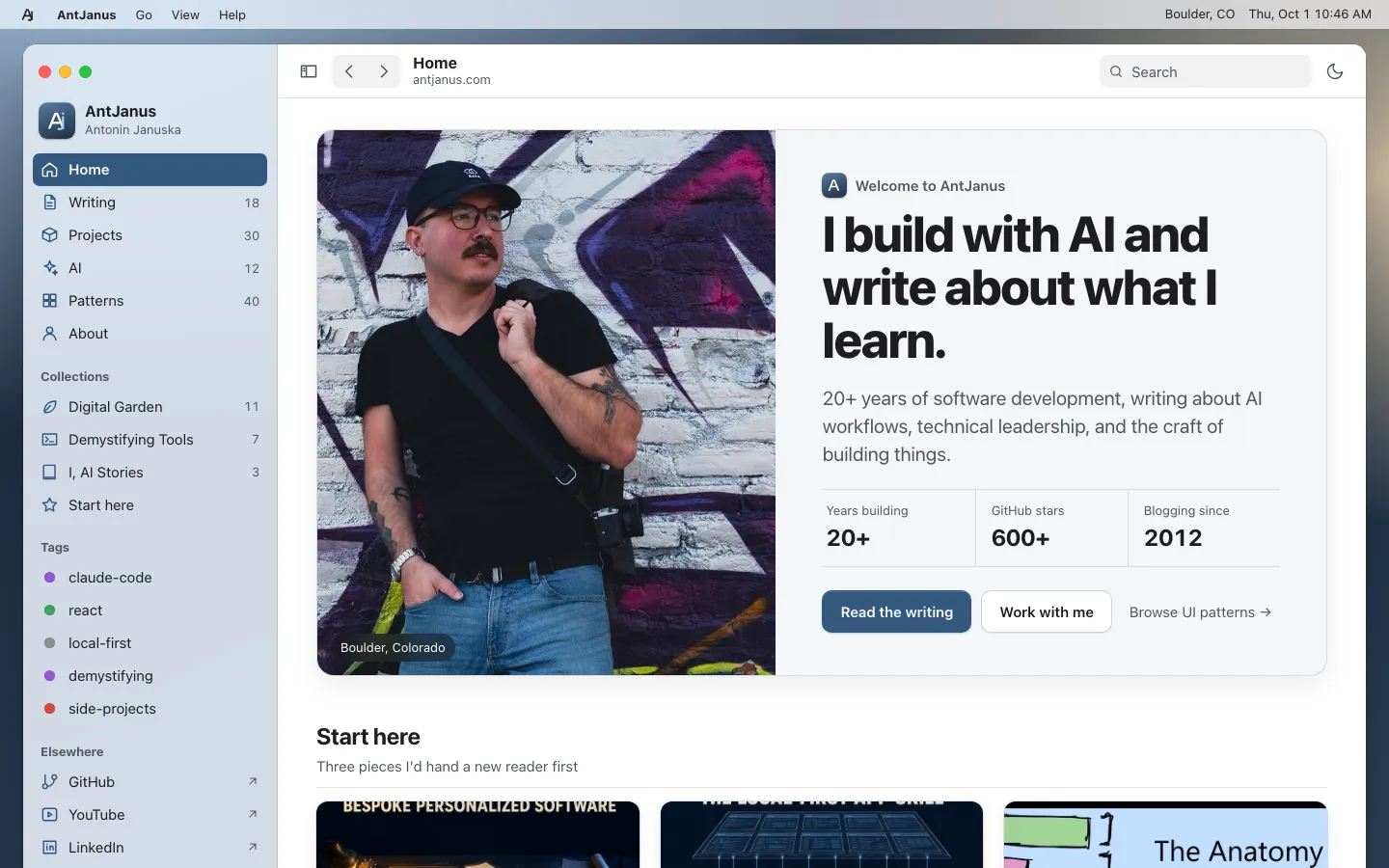
A home page dressed as a macOS app: a menu bar with working menus and a clock over a slate wallpaper, one rounded window with traffic lights, a translucent source-list sidebar with count badges and Finder tags, a unified toolbar, and a Welcome sheet over shelves, grouped lists and app icons.
Paste this into an agent to rebuild the whole page from scratch.
Build a personal home page that looks and behaves like a native macOS app sitting on a desktop. A thin menu bar runs across the top, a slate wallpaper fills the screen, and one rounded window holds the site, with traffic lights, a source-list sidebar and a unified toolbar. The page still scrolls like a normal website, so find-in-page, deep links and screenshots keep working.
At 1100px and wider, make the body the desktop: a sticky 28px menu bar and, below it, a window about 1380px wide with 12px corner radius, a hairline border and a large soft shadow, centred with 20px of wallpaper showing around it. Inside, use a two-column grid: a 240px sidebar that stays pinned (sticky, its own scroll) and a main column with a sticky 52px toolbar, the content, a status bar and the footer. From 900px to 1099px drop the desktop and make the window flush with the viewport. Below 900px, turn it into an iPhone-style shell: the sidebar becomes a slide-in drawer behind a scrim, and a fixed bottom tab bar with five icon tabs replaces it.
Use the system stack everywhere: `-apple-system, BlinkMacSystemFont, "SF Pro Text", Inter, sans-serif` for UI at 17px, `ui-serif, "New York", "Source Serif 4", serif` for ledes and reading text, and `ui-monospace, "SF Mono", "JetBrains Mono", monospace` for stat labels. Headings are semibold with slight negative tracking, around 2.4rem for the welcome title. Nothing renders below 13px.
Define semantic tokens once and swap them per theme. Light: window `#ffffff`, content background `#f5f6f8`, grouped rows `#e8ecf1` separators, text `#1d1d1f`, secondary `#50555d`. Dark: `#1e1f22` and `#26282c` surfaces with `#ececee` text. The accent defaults to the brand slate (`#34587f` fill, `#3a6391` on hover, `#8db6e3` as the dark-theme text accent), and keep separate accent fill and accent text tokens so white-on-accent selections and accent-on-surface links both clear AA. Paint the wallpaper with three stacked radial gradients in slate blues and the sidebar column as a translucent fill with `backdrop-filter: blur(20px) saturate(1.6)` so the wallpaper tints through; every content surface stays opaque. A `Reduce Transparency` action (and the OS setting) swaps the sidebar to a solid fill. Theme follows the OS, with a toolbar moon button and the View menu as overrides, stored in `localStorage` inside try/catch.
The menu bar has a logo glyph, a bold app name and `Go`, `View` and `Help` buttons that open real dropdown menus (rounded 8px panels, 6px padding, accent-highlighted rows, right-aligned shortcut hints in `<kbd>`), closing on Escape or an outside click; the right side shows a location and a live clock. The sidebar starts with red, yellow and green traffic lights (the green one toggles a full-width window), then an app-icon brand row, a search field, an unlabelled Library list (Home, Writing, Projects, AI, Patterns, About) with grey count badges, then Collections, Finder-style coloured Tags as dots, and Elsewhere links; its footer holds an accent-colour picker of five round swatches (Slate, Blue, Purple, Green, Graphite) that re-tints every selection, link and primary button. The selected sidebar row is an accent-filled rounded rectangle with white text, and it follows the section in view as the reader scrolls. The toolbar holds a sidebar toggle, back and forward chevrons, a two-line title, a search field and the theme button.
The content opens with a Welcome card split between the portrait (with a frosted caption chip) and copy: a small app icon and `Welcome to AntJanus`, the headline, a serif lede, a three-cell spec list styled like About This Mac, and primary, secondary and text buttons. Then a Start here shelf and an AI shelf of image cards with uppercase kickers, the Digital Garden as a System Settings grouped list (inset rounded group, coloured symbol tiles, title and description, a date and a chevron per row), AI Experiments as Launchpad-style 64px gradient app icons with labels, and a three-column trio of grouped Connect and Projects lists beside a dark slate Work With Me card. A slim status bar shows a breadcrumb path and content counts, and the footer sits inside the window.
Keep motion to menu fades and sidebar drawer slides of about 200ms, cut under `prefers-reduced-motion`. On phones the shelves become horizontally scrolling rows inside their own overflow so the page never widens, and the tab bar pads for the home indicator with `env(safe-area-inset-bottom)`. Resist adding blur to content cards; the native feel comes from restraint with materials and from every control actually working.
One self-contained file: markup, styles and scripts together.
Loading the page source…
The demo's desktop shell holds its whole home page: a Welcome card with spec-style stats, Start here and AI card shelves, the Digital Garden as a System Settings grouped list, AI Experiments as Launchpad icons, a Connect, Projects and Work With Me trio, a status bar and a footer. It feels native because each block borrows one real macOS idiom and the translucency is limited to the sidebar; the content stays on opaque surfaces.
Sections, top to bottom
- Menu bar with AntJanus, Go, View and Help menus
- Window chrome: traffic lights, source-list sidebar with accent picker, toolbar
- Welcome card with portrait and stats
- Start here shelf
- AI and Machine Learning shelf
- Digital Garden grouped list
- AI Experiments Launchpad icons
- Connect, Projects and Work With Me trio
- Status bar and footer with newsletter
- Type
- SF Pro via -apple-system, Inter fallback (UI, headings) · New York via ui-serif, Source Serif 4 fallback (article prose, ledes) · SF Mono via ui-monospace, JetBrains Mono fallback (code, stat labels)
- Themes
- light+dark
- Palette
#364f6a#34587f#3a6391#8db6e3#1f2f42#ffffff#f5f6f8#e8ecf1#1d1d1f#50555d#1e1f22#26282c#ececee#ff5f57#febc2e#28c840