Plan preview tree
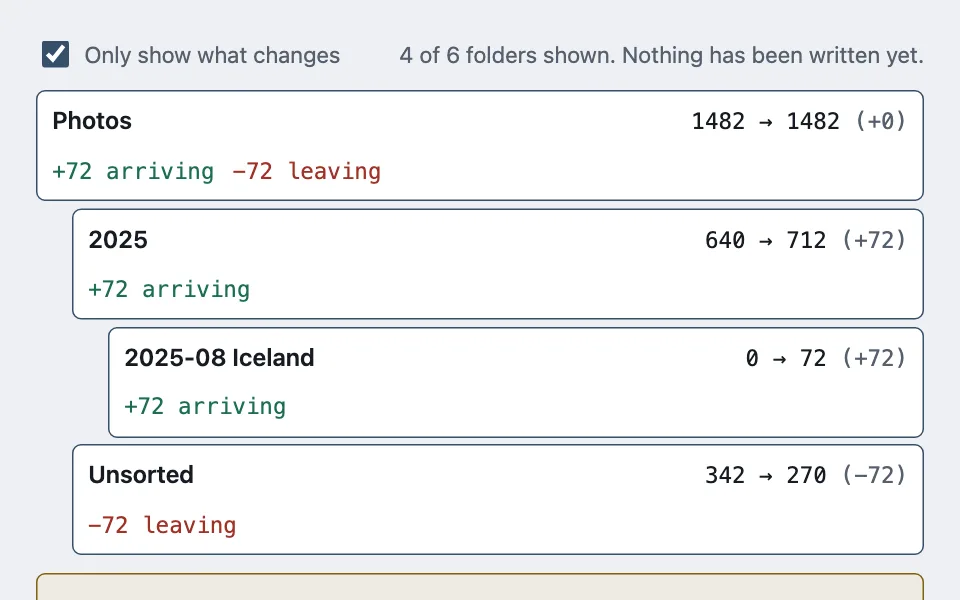
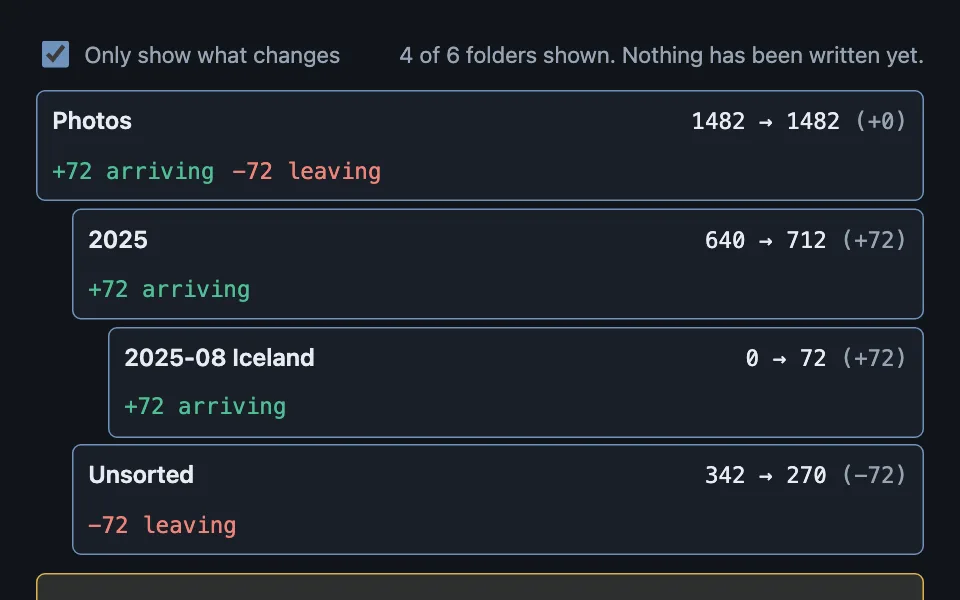
A dry run shown as a before-and-after tree: every node carries its count now, its count after, and the arrivals and departures that make up the difference — with status rolling up the tree so "hide what does not change" is one filter rather than a recursive walk.
Reach for it when building
- a file organise or move operation
- a bulk rename preview
- an import that will create folders
- a migration plan before it runs
- a permissions change across groups
- any destructive batch job worth previewing
<div class="ppt-demo">
	<div class="ppt-bar">
		<label class="ppt-toggle">
			<input type="checkbox" id="ppt-only" checked />
			<span>Only show what changes</span>
		</label>
		<p class="ppt-summary" id="ppt-summary" role="status"></p>
	</div>

	<ul class="ppt-tree" id="ppt-tree"></ul>

	<p class="ppt-warn" id="ppt-warn" hidden></p>

	<div class="ppt-actions">
		<button type="button" class="ppt-btn ppt-primary">Apply this plan</button>
		<button type="button" class="ppt-btn">Discard</button>
	</div>
</div>
Colors come from shared theme tokens — --surface, --ink, --border, --accent and friends — so this CSS carries no palette
of its own. Use Runnable file to copy the tokens along with it.
.ppt-demo { display: flex; flex-direction: column; gap: 0.75rem; max-width: 600px; }

.ppt-bar { display: flex; flex-wrap: wrap; gap: 0.5rem 1rem; align-items: center; justify-content: space-between; }
.ppt-toggle { display: inline-flex; align-items: center; gap: 0.45rem; font-size: 0.9375rem; color: var(--dim); cursor: pointer; }
.ppt-toggle input { width: 18px; height: 18px; accent-color: var(--accent); }
.ppt-summary { margin: 0; font-size: 0.9375rem; color: var(--dim); }

.ppt-tree { list-style: none; margin: 0; padding: 0; display: flex; flex-direction: column; gap: 0.3rem; }

.ppt-node {
	display: grid;
	grid-template-columns: minmax(0, 1fr) auto;
	gap: 0.5rem 0.75rem;
	align-items: baseline;
	padding: 0.45rem 0.6rem;
	border: 1px solid var(--border);
	border-radius: calc(var(--radius) - 4px);
	background: var(--surface);
}

/* Depth is indentation only. The tree is a flat list in the DOM, because a
   nested list cannot be filtered without orphaning children. */
.ppt-node[data-depth='1'] { margin-left: 1.5rem; }
.ppt-node[data-depth='2'] { margin-left: 3rem; }

.ppt-node[data-status='kept'] { background: var(--surface-2); color: var(--dim); }
.ppt-node[data-status='changed'] { border-color: var(--accent); }

.ppt-name { font-weight: 600; }
.ppt-node[data-status='kept'] .ppt-name { font-weight: 400; }

.ppt-counts { font-family: var(--mono); font-variant-numeric: tabular-nums; white-space: nowrap; font-size: 0.9375rem; }
.ppt-delta { color: var(--dim); }

.ppt-moves { grid-column: 1 / -1; display: flex; flex-wrap: wrap; gap: 0.75rem; font-size: 0.9375rem; font-family: var(--mono); }
.ppt-in { color: var(--ok); }
.ppt-out { color: var(--bad); }

.ppt-warn {
	margin: 0;
	padding: 0.6rem 0.75rem;
	border: 1px solid var(--warn);
	border-radius: calc(var(--radius) - 4px);
	background: color-mix(in oklab, var(--warn) 12%, var(--surface));
	color: var(--ink);
	font-size: 0.9375rem;
}

.ppt-warn[hidden] { display: none; }

.ppt-actions { display: flex; flex-wrap: wrap; gap: 0.5rem; }

.ppt-btn {
	font: inherit;
	min-height: 44px;
	padding: 0.5rem 0.9rem;
	border-radius: calc(var(--radius) - 4px);
	border: 1px solid var(--border);
	background: var(--surface-2);
	color: var(--ink);
	cursor: pointer;
}

.ppt-primary { background: var(--accent); border-color: var(--accent); color: var(--accent-ink); font-weight: 600; }
const CROWDED = 700;
const NODES = [
{ depth: 0, name: 'Photos', before: 1482, arrive: 72, depart: 72 },
{ depth: 1, name: '2025', before: 640, arrive: 72, depart: 0 },
{ depth: 2, name: '2025-08 Iceland', before: 0, arrive: 72, depart: 0 },
{ depth: 2, name: '2025-07', before: 210, arrive: 0, depart: 0 },
{ depth: 1, name: 'Unsorted', before: 342, arrive: 0, depart: 72 },
{ depth: 1, name: 'Screenshots', before: 760, arrive: 0, depart: 0 }
];
const tree = document.getElementById('ppt-tree');
const summary = document.getElementById('ppt-summary');
const warn = document.getElementById('ppt-warn');
const only = document.getElementById('ppt-only');
/* One node's own status. Because a parent's counts already include everything
its children moved, this is all that is needed — no descendant walk. */
function statusOf(node) {
return node.arrive === 0 && node.depart === 0 ? 'kept' : 'changed';
}
function render() {
const hideUnchanged = only.checked;
const shown = NODES.filter((node) => !hideUnchanged || statusOf(node) === 'changed');
tree.innerHTML = '';
for (const node of shown) {
const after = node.before + node.arrive - node.depart;
const delta = after - node.before;
const row = document.createElement('li');
row.className = 'ppt-node';
row.dataset.depth = String(node.depth);
row.dataset.status = statusOf(node);
row.innerHTML =
'<span class="ppt-name"></span>' +
'<span class="ppt-counts"></span>' +
'<span class="ppt-moves"></span>';
row.querySelector('.ppt-name').textContent = node.name;
row.querySelector('.ppt-counts').innerHTML =
node.before + ' → ' + after + ' <span class="ppt-delta">(' + (delta >= 0 ? '+' : '') + delta + ')</span>';
const moves = row.querySelector('.ppt-moves');
if (node.arrive > 0) {
const arriving = document.createElement('span');
arriving.className = 'ppt-in';
arriving.textContent = '+' + node.arrive + ' arriving';
moves.append(arriving);
}
if (node.depart > 0) {
const leaving = document.createElement('span');
leaving.className = 'ppt-out';
leaving.textContent = '−' + node.depart + ' leaving';
moves.append(leaving);
}
tree.append(row);
}
summary.textContent =
shown.length + ' of ' + NODES.length + ' folders shown. Nothing has been written yet.';
/* Say which destination gets uncomfortable, and why it matters, before the
plan runs rather than after. Only a node that actually nets gain files
can be made crowded by this plan -- checking the after-count alone also
flags folders the plan never touches and nodes whose arrivals and
departures cancel out to no real change. */
const crowded = NODES.filter(
(node) => node.arrive > node.depart && node.before + node.arrive - node.depart > CROWDED
);
warn.hidden = crowded.length === 0;
if (crowded.length > 0) {
warn.textContent =
crowded.map((node) => node.name).join(', ') +
' would hold more than ' + CROWDED + ' files. Folders that size are slow to open and awkward to browse.';
}
}
only.addEventListener('change', render);
render();Paste this into an agent to rebuild the pattern from scratch.
Build a dry run for a bulk operation: a tree of destinations where each node shows the count it holds now, the count it would hold, and the arrivals and departures that make up the difference. Nothing is written until someone approves the plan.
Reach for this before any batch job that moves, renames, or deletes at scale — organising files, a bulk rename, an import that creates folders, a permissions change across groups. Walk away when the operation touches one item, where a preview is slower than the undo.
The rule that makes it work: **status rolls up the tree.** A node counts as unchanged only when every descendant is also unchanged, which falls out for free if each parent's counts already include its children's movements. That single invariant turns "only show what changes" into a one-line filter on each node's own status. Without it, every render needs a recursive "does any descendant change?" walk, and the first thing that breaks is a parent hiding while its changed child is orphaned below.
Keep the tree flat in the DOM and express depth with indentation. A genuinely nested list cannot be filtered node by node — hiding a branch takes its children with it whether or not they changed.
Show arrivals and departures as separate figures, not as one net number. "+72 arriving" and "−72 leaving" describe a move; "0" describes nothing, and a net of zero is exactly where people stop reading.
**Warn about the shape of the result, not just the count.** If a destination would end up holding more files than is comfortable, say so and say why it matters — slow to open, awkward to browse — while the plan can still be changed. A warning after the move is a complaint.
Put the summary in a `role="status"` region and state plainly that nothing has been written. A preview that looks like a result is the most expensive ambiguity in the whole interaction.
Keep the approve and discard actions together at the end, with approve as the only emphasised control. Every colour comes from theme custom properties, and the arriving and leaving colours must stay distinguishable from each other and from the unchanged rows in both themes.