Cross-highlight matrix
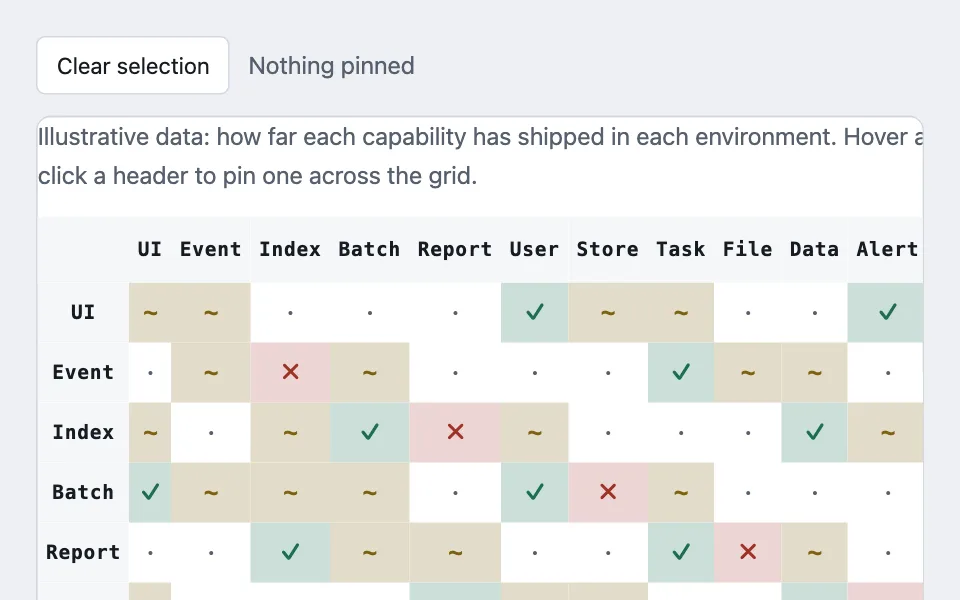
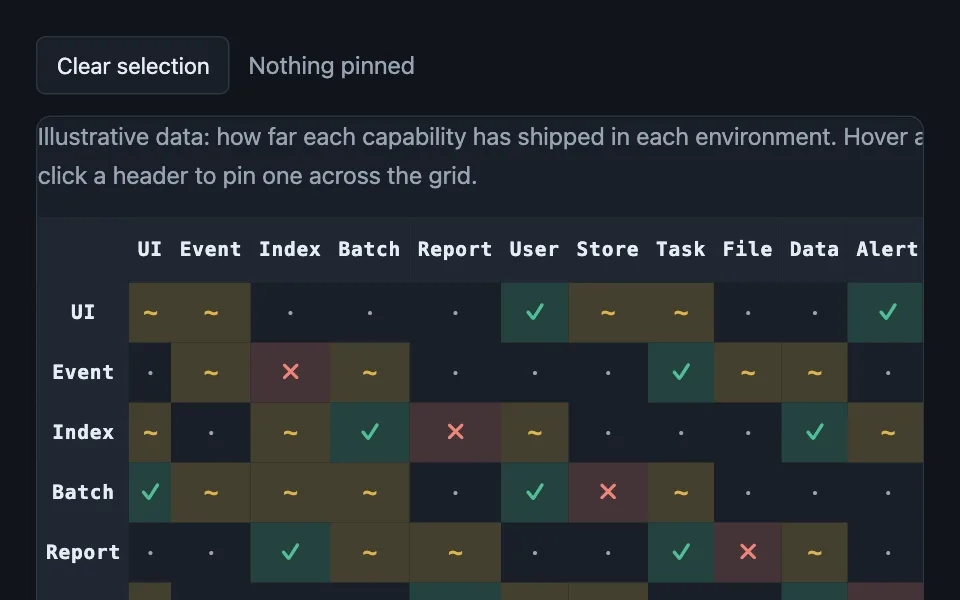
A two-axis lookup table with both headers sticky, hover lighting the full row and column at once, and a durable click-to-pin selection for touch.
Reach for it when building
- type effectiveness chart
- compatibility matrix
- permissions grid
- routing table
- test results against environments
- feature support matrix
<div class="cmx-wrap">
	<div class="cmx-controls">
		<button class="cmx-btn" id="cmx-clear" type="button">Clear selection</button>
		<span class="cmx-readout" id="cmx-readout"></span>
	</div>
	<div class="cmx-scroll" role="group" aria-label="Compatibility factor between a row category and a column category" tabindex="0">
		<table class="cmx-table" id="cmx-table"></table>
	</div>
	<div class="cmx-key" id="cmx-key"></div>
</div>
Colors come from shared theme tokens — --surface, --ink, --border, --accent and friends — so this CSS carries no palette
of its own. Use Runnable file to copy the tokens along with it.
.cmx-wrap { display: flex; flex-direction: column; gap: 0.9rem; }

.cmx-controls { display: flex; align-items: center; gap: 0.75rem; }

.cmx-btn {
	font: inherit;
	font-size: 0.9375rem;
	padding: 0.4rem 0.8rem;
	border: 1px solid var(--border);
	border-radius: 6px;
	background: var(--surface);
	color: var(--ink);
	cursor: pointer;
}

.cmx-readout { color: var(--dim); }

.cmx-scroll {
	overflow: auto;
	max-height: 460px;
	border: 1px solid var(--border);
	border-radius: var(--radius);
	background: var(--surface);
}

.cmx-table { border-collapse: collapse; table-layout: fixed; }
.cmx-table th, .cmx-table td { padding: 0; margin: 0; }
.cmx-table th { background: var(--surface-2); }

/* Three-tier sticky stack: the corner has to sit above both the column
   headers scrolling under it and the row headers scrolling past it. */
.cmx-corner { position: sticky; top: 0; left: 0; z-index: 3; width: 84px; height: 44px; }
.cmx-table thead th:not(.cmx-corner) { position: sticky; top: 0; z-index: 2; height: 44px; width: 50px; }
.cmx-table tbody th { position: sticky; left: 0; z-index: 1; width: 84px; height: 40px; }

.cmx-cell-btn {
	width: 100%;
	height: 100%;
	border: none;
	background: none;
	cursor: pointer;
	font-family: var(--mono);
	font-size: 0.8125rem;
	font-weight: 700;
	letter-spacing: 0.04em;
	color: var(--ink);
	padding: 0 0.35rem;
}

.cmx-table td {
	height: 40px;
	width: 50px;
	text-align: center;
	font-variant-numeric: tabular-nums;
	font-weight: 600;
	font-size: 1rem;
}

/* An outline with a negative offset draws inside the cell instead of pushing
   its neighbours, which a border would do inside a collapsed-border table. */
.cmx-table .cmx-hl { outline: 2px solid var(--signal); outline-offset: -2px; }

.cmx-table caption { caption-side: top; text-align: left; padding: 0 0 0.9rem; color: var(--dim); font-size: 1rem; }

.cmx-key { display: flex; flex-wrap: wrap; gap: 0.5rem 1.25rem; font-size: 1rem; }
.cmx-key span { display: inline-flex; align-items: center; gap: 0.45rem; }
.cmx-key i {
	width: 34px;
	height: 24px;
	border-radius: 4px;
	display: grid;
	place-items: center;
	font-style: normal;
	font-weight: 700;
	font-size: 0.8125rem;
	font-family: var(--mono);
	box-shadow: inset 0 0 0 1px var(--border);
}
(function () {
var categories = [
['Dashboard', 'UI'], ['Webhook', 'Event'], ['Search', 'Index'], ['Import', 'Batch'],
['Export', 'Report'], ['Auth', 'User'], ['Cache', 'Store'], ['Queue', 'Task'],
['Storage', 'File'], ['Migrate', 'Data'], ['Monitor', 'Alert'], ['Config', 'Admin']
];
// Same twelve labels on both axes, so the deterministic spread below reads
// as a plausible, non-random lookup rather than a real dataset.
var cellStyles = {
0: { label: '\u2717', fill: 'color-mix(in srgb, var(--bad) 20%, var(--surface))', ink: 'var(--bad)', name: 'not available' },
50: { label: '~', fill: 'color-mix(in srgb, var(--warn) 22%, var(--surface))', ink: 'var(--warn)', name: 'in beta' },
100: { label: '\u00b7', fill: 'transparent', ink: 'var(--dim)', name: 'stable' },
200: { label: '\u2713', fill: 'color-mix(in srgb, var(--ok) 22%, var(--surface))', ink: 'var(--ok)', name: 'production ready' }
};
function factorFor(rowIndex, columnIndex) {
if (rowIndex === columnIndex) return 50;
var spread = (rowIndex * 7 + columnIndex * 13) % 11;
if (spread < 1) return 0;
if (spread < 4) return 50;
if (spread < 9) return 100;
return 200;
}
var table = document.getElementById('cmx-table');
var readout = document.getElementById('cmx-readout');
var hoveredRow = null;
var hoveredColumn = null;
var pinnedIndex = null;
function renderMatrix() {
var html = '<caption>Illustrative data: how far each capability has shipped in each environment. Hover a cell, or click a header to pin one across the grid.</caption><thead><tr><th class="cmx-corner"></th>';
for (var columnIndex = 0; columnIndex < categories.length; columnIndex += 1) {
var column = categories[columnIndex];
html += '<th scope="col"><button type="button" class="cmx-cell-btn" data-col="' + columnIndex +
'" title="' + column[0] + ' (column)" aria-label="Column ' + column[0] + '">' + column[1] + '</button></th>';
}
html += '</tr></thead><tbody>';
for (var rowIndex = 0; rowIndex < categories.length; rowIndex += 1) {
var row = categories[rowIndex];
html += '<tr><th scope="row"><button type="button" class="cmx-cell-btn" data-row="' + rowIndex +
'" title="' + row[0] + ' (row)" aria-label="Row ' + row[0] + '">' + row[1] + '</button></th>';
for (var innerColumnIndex = 0; innerColumnIndex < categories.length; innerColumnIndex += 1) {
var column = categories[innerColumnIndex];
var factor = factorFor(rowIndex, innerColumnIndex);
var style = cellStyles[factor];
if (!style) throw new Error('unknown factor ' + factor);
html += '<td style="background:' + style.fill + ';color:' + style.ink + '" data-row="' + rowIndex +
'" data-col="' + innerColumnIndex + '" title="' + row[0] + ' \u00d7 ' + column[0] + ': ' + style.name + '">' +
style.label + '</td>';
}
html += '</tr>';
}
table.innerHTML = html + '</tbody>';
paintHighlight();
}
// Repainting all 144 cells on every pointer move flickers and re-fires
// mouseover on the element under the cursor, so the hover path only ever
// toggles a class on cells that already exist.
function paintHighlight() {
var cells = table.querySelectorAll('td');
for (var index = 0; index < cells.length; index += 1) {
var cell = cells[index];
var rowIndex = Number(cell.getAttribute('data-row'));
var columnIndex = Number(cell.getAttribute('data-col'));
var lit = hoveredRow === rowIndex || hoveredColumn === columnIndex ||
pinnedIndex === rowIndex || pinnedIndex === columnIndex;
cell.classList.toggle('cmx-hl', lit);
}
readout.textContent = pinnedIndex === null
? 'Nothing pinned'
: 'Pinned: ' + categories[pinnedIndex][0] + ' \u2014 the same highlight a tap gives you';
}
function targetIndexes(target) {
var rowAttribute = target.getAttribute('data-row');
var columnAttribute = target.getAttribute('data-col');
return {
row: rowAttribute === null ? null : Number(rowAttribute),
column: columnAttribute === null ? null : Number(columnAttribute)
};
}
table.addEventListener('mouseover', function (event) {
var target = event.target.closest('td, .cmx-cell-btn');
if (!target) return;
var indexes = targetIndexes(target);
hoveredRow = indexes.row;
hoveredColumn = indexes.column;
paintHighlight();
});
table.addEventListener('mouseleave', function () {
hoveredRow = null;
hoveredColumn = null;
paintHighlight();
});
// Mirroring hover on focusin is what gives keyboard users the same
// cross-highlight a mouse gets for free.
table.addEventListener('focusin', function (event) {
var button = event.target.closest('.cmx-cell-btn');
if (!button) return;
var indexes = targetIndexes(button);
hoveredRow = indexes.row;
hoveredColumn = indexes.column;
paintHighlight();
});
table.addEventListener('click', function (event) {
var button = event.target.closest('.cmx-cell-btn');
if (!button) return;
var rowAttribute = button.getAttribute('data-row');
var index = Number(rowAttribute !== null ? rowAttribute : button.getAttribute('data-col'));
pinnedIndex = pinnedIndex === index ? null : index;
paintHighlight();
});
document.getElementById('cmx-clear').addEventListener('click', function () {
pinnedIndex = null;
renderMatrix();
});
var keyFactors = [0, 50, 100, 200];
var keyHtml = '';
for (var keyIndex = 0; keyIndex < keyFactors.length; keyIndex += 1) {
var keyStyle = cellStyles[keyFactors[keyIndex]];
keyHtml += '<span><i style="background:' + keyStyle.fill + ';color:' + keyStyle.ink + '">' +
keyStyle.label + '</i>' + keyStyle.name + '</span>';
}
document.getElementById('cmx-key').innerHTML = keyHtml;
renderMatrix();
})();Paste this into an agent to rebuild the pattern from scratch.
Build a two-axis lookup table — the same set of categories on both rows and columns, a computed factor in every cell — where hovering lights the full row and column at once and a click leaves a durable pin.
Use it for any square or rectangular relationship table where a person needs to read "this row against this column" without losing track of either axis: type-effectiveness charts, compatibility matrices, routing or permission grids, a matrix of test results against environments. Skip it for a table with more than a couple dozen rows, because the sticky-header trick and the cross-highlight both degrade once the grid needs its own scrollbar-within-scrollbar just to reach a header, and skip it when the table has no natural "read one row and one column together" use — a plain data table is simpler and just as accessible.
Encode every value with a distinct fill color and a distinct short glyph together, never color alone: "×0", "×½", "·", "×2" rather than four shades of one hue. The neutral cell deliberately gets no fill of its own — leave it `transparent` — so its glyph lands on the surface behind the table rather than fighting a color that means nothing.
Build the header stack for three levels of stickiness at once: the corner cell (`position: sticky; top: 0; left: 0; z-index: 3`) has to out-rank both the column headers (`position: sticky; top: 0; z-index: 2`) scrolling underneath it and the row headers (`position: sticky; left: 0; z-index: 1`) scrolling past it. Pair `table-layout: fixed` with `border-collapse: collapse` so every column holds a stable width regardless of content.
Draw the highlight as an `outline` with a negative `outline-offset`, never a `border` — a border adds to a cell's box and shifts its neighbours inside a collapsed-border table, while a negative-offset outline draws entirely inside the existing cell edge.
Make every header a real `<button>` inside a `<th scope="row">` or `<th scope="col">`, not a styled `<div>`, and mirror the hover handler on `focusin` so tabbing to a header produces the identical cross-highlight a mouse hover would. For the repaint itself, never re-render all the cells on pointer move — that flickers and, worse, re-fires `mouseover` on whatever now sits under the cursor once the DOM swaps. Track the hovered row and column in two variables and have a single highlight pass toggle a class on the cells that already exist.
None of this reaches touch, because hover never fires there. Route the durable click-to-pin selection through the exact same highlight function the hover path uses, so a tap produces the same lit row-and-column a mouse hover gives for free — that's the whole reason the pin exists rather than being an unrelated "select a row" feature bolted on afterward.
**When the table is wide rather than square, group the columns and let people switch groups off.** A matrix has two axes and every column belongs to the axis; a wide data table does not, and its columns fall into families — cost, interest, schedule. Give each column a group name, render a pill per group, and show a column when it declares no group or its group is on.
Omitting the group is what makes a column permanent, so the identity column needs no special case in the filter — which is the whole reason to express it as a missing value rather than a boolean flag on every other column.
Keep the header explanations on a focusable element — a dotted-underline span with `tabindex="0"` — so the definition of a column opens on focus and not only on hover. Column headers are exactly where an abbreviation nobody can expand ends up, and hover-only help does not exist on touch.
Compute every cell's value from a small pure function of its two indexes rather than a lookup object, so a missing pair is structurally impossible; if you do use a lookup table instead, make a missing pair throw rather than render blank, since a blank cell in this kind of matrix reads as "no relationship" when it actually means "the data is broken." Take every color from theme custom properties, and check both themes — the outline-based highlight in particular has to stay visible against both.