Retro OS Desktop
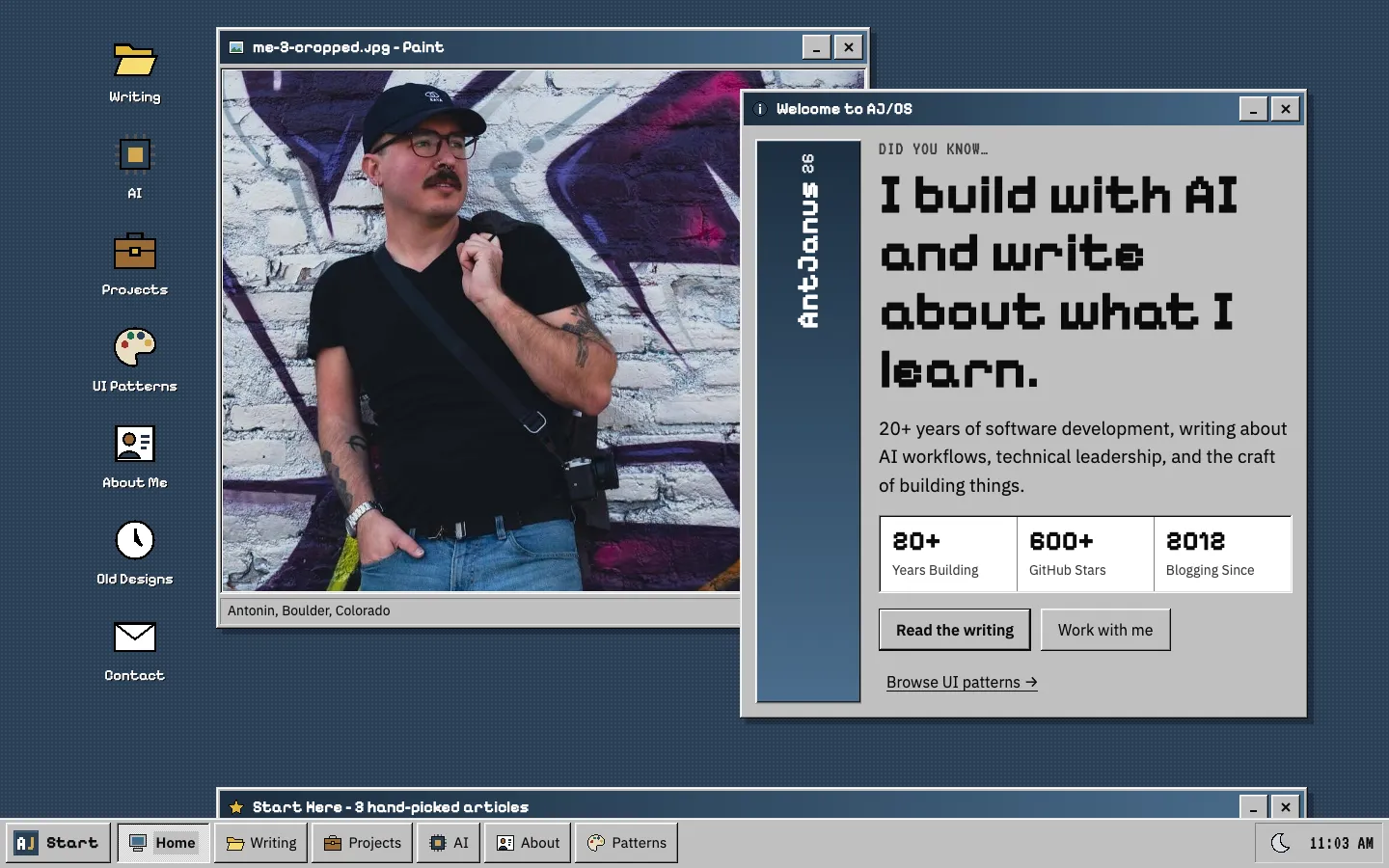
A Windows 95 style desktop on a dotted slate wallpaper: shortcut icons down the left, an overlapping Paint window with the portrait and a Welcome to AJ/OS window with a pixel headline and stats, then Explorer, Control Panel and Properties windows, all above a grey taskbar with a Start button and a clock.
Paste this into an agent to rebuild the whole page from scratch.
Build a personal homepage as a Windows 95 style desktop. The page is the desktop and every section is an application window, with a taskbar fixed to the bottom instead of a top nav. Keep the nostalgia in the chrome and keep the content modern and legible: real body text at `17px`, nothing smaller than `13px`.
Paint the desktop slate `#2a3f54` with a `4px` dot grid of `#314a62` dots. Lay it out in a `1320px` container with `104px` bottom padding to clear the taskbar, as a `112px` rail of shortcut icons beside a main column. Shortcuts are `48px` pixel-style icons (folder, chip, briefcase, palette, card, clock, envelope) with white labels that carry a `1px` black text shadow and turn into a slate selection with a dotted outline on hover or focus. The main column is a 12-column grid of windows (`span-7` beside `span-5`, full `span-12`, three `span-4`).
Build the bevels from four inset box-shadows, the classic way. **Raised** is `inset -1px -1px #0a0a0a, inset 1px 1px #fff, inset -2px -2px #808080, inset 2px 2px #dfdfdf`; **sunken** reverses them; a window adds a `6px 6px 0` hard drop shadow at 28% black. Windows are face grey `#c0c0c0` with `4px` padding. Title bars are at least `34px` tall with a horizontal gradient from `#1c2e40` to `#4a6d8c`, a `16px` icon, a white **Pixelify Sans** title, and minimise, maximise and close buttons drawn as tiny raised keys with hit areas extended to `44px`. Content sits in white sunken fields with `14px` padding; status bars at the foot of a window are split into sunken cells. Buttons are raised, depress to sunken on press with a one-pixel text shift, and use the dotted focus rectangle. Links are navy `#00008b` and underlined.
Type: **Pixelify Sans** for window titles, headings and desktop labels; **IBM Plex Sans** for body; **IBM Plex Mono** for addresses, dates and chips; **VT323** only for eyebrows and the taskbar clock. The dark theme keeps the shapes and swaps the materials: desktop `#0a1017`, face `#2c3038`, highlight `#5f6773`, shadow `#15181c`, fields `#15181d`, text `#e9ebef` and links `#9cc3f0`. A tray button switches themes and stores the choice in `localStorage` inside try/catch.
Open with two overlapping windows: a Paint window titled with the portrait's filename, about 60% wide at the top left, with the photo in a sunken field and a caption bar; and a Welcome window about 52% wide, offset `64px` down on the right and layered above it, holding a vertical banner strip with the site name set sideways, a VT323 Did you know eyebrow, a large Pixelify H1, a lede, a three-cell sunken stat row and two buttons. Below come a Start Here window of three article cards, an Explorer window for AI writing with an address bar and a Name / Modified details list, a Digital Garden window of file rows, an AI Experiments Control Panel of large icons with captions, a UI Pattern Library Properties dialog with a General tab, the blueprint image, Type / Built with / Location rows, three stat cells and a button, then Dial-Up Networking, My Briefcase and Work With Me windows, and a footer window titled About AJ/OS.
The taskbar is `52px`, face grey with a light top edge: a bold Start button that opens a Start menu (every section, plus Arrange windows and the theme switch, navigable with arrow keys and closed with Escape), task buttons for each section with the current one drawn pressed and following the window in view, a slot where closed windows can be restored, and a sunken tray with the theme button and a live clock. On wide screens with a fine pointer, windows drag by their title bars; double-clicking a title or choosing Arrange windows puts everything back. Inject the window controls from script so the page reads fully without it.
The effect depends on exact bevels and restraint: one gradient (the title bar), flat grey everywhere else, and no rounded corners at all. Below `1100px` the shortcut rail becomes a wrapping row of smaller icons and most windows go full width; below `860px` the two hero windows stop overlapping and stack, and nothing scrolls sideways at `400px`. A window opens with a stepped `160ms` scale from `0.96` in four steps and buttons switch bevel over `80ms`; both are removed under `prefers-reduced-motion`.
One self-contained file: markup, styles and scripts together.
Loading the page source…
The whole page is the desktop: every section is a bevelled window with a gradient title bar, and windows can be dragged, rolled up, maximised or closed to the taskbar. Writing shows as Explorer windows, experiments as a Control Panel, the pattern library as a Properties dialog, and contact as Dial-Up Networking and My Briefcase; the Start menu works and the taskbar's task buttons follow the window in view.
Sections, top to bottom
- Desktop with shortcut icons, Paint portrait window and Welcome to AJ/OS window
- Start Here window: three hand-picked articles
- C:\Writing\AI Explorer window
- C:\Writing\Digital Garden window
- AI Experiments Control Panel
- UI Pattern Library Properties dialog
- Dial-Up Networking, My Briefcase and Work With Me windows
- About AJ/OS footer window
- Taskbar with Start menu and clock
- Type
- Pixelify Sans (window titles, headings, desktop labels) · IBM Plex Sans (body and UI text) · IBM Plex Mono (code, dates, chips) · VT323 (eyebrows, article meta, clock)
- Themes
- light+dark
- Palette
#2a3f54#314a62#c0c0c0#ffffff#dfdfdf#808080#0a0a0a#1c2e40#4a6d8c#00008b#ffffe1#e2b93b#0a1017#2c3038#15181d#e9ebef#9cc3f0