The Future is Bespoke, Personalized Software
Every app I use is about 70% right. The last 30% never ships because the addressable market for it is one person -- me. So I built seven apps that are 100% right for one person, and I think that whole category of software is about to get eaten.
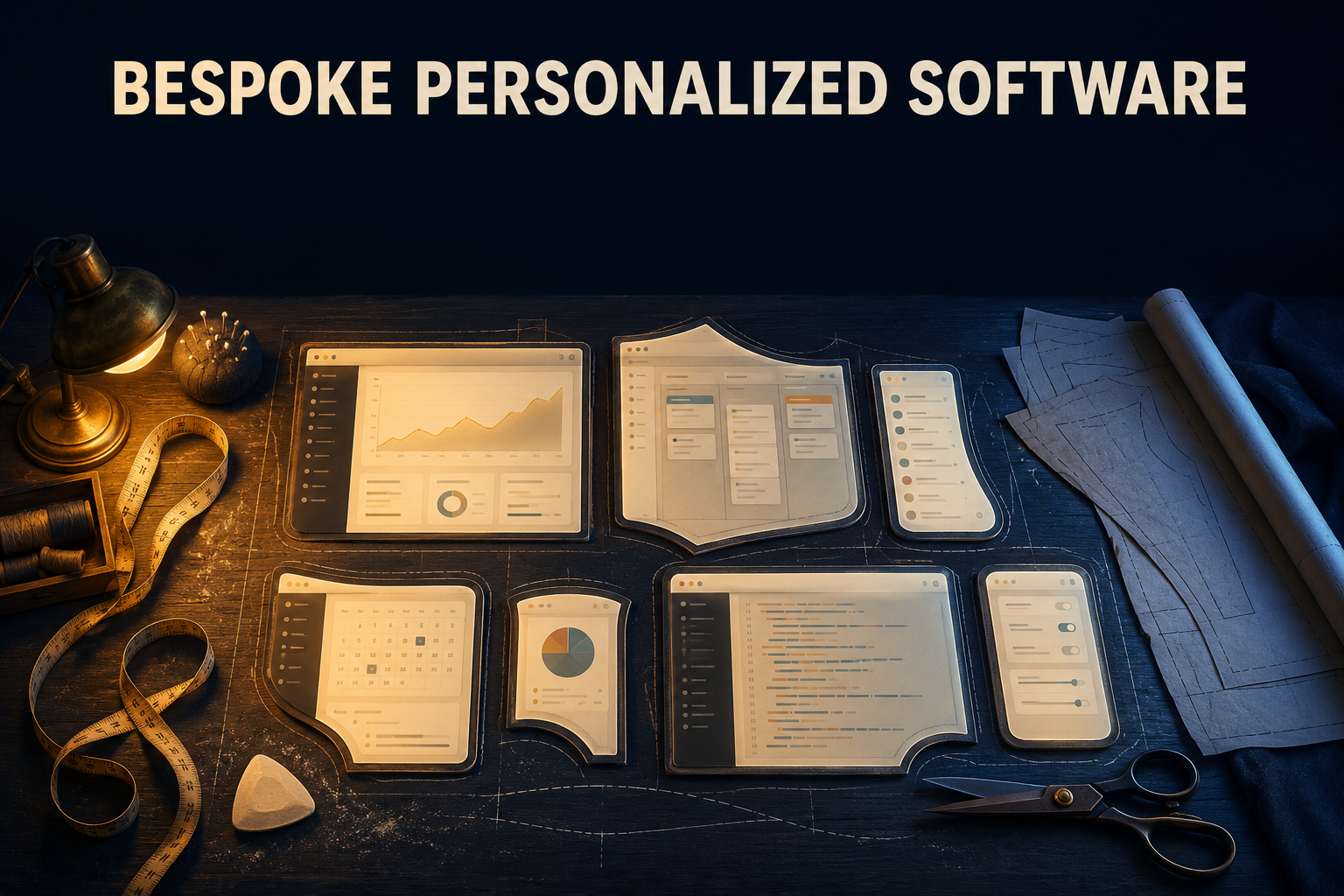
As a software user, I tend to oscillate between heavily dogmatic and prescribed software, and software that one could customize endlessly. Kind of like comparing VS Code to VIM. Sure, VS Code is customizable but most people just keep the recommended settings. While VIM? VIM users usually go through a multi-step process to customize their own editor – usually without ever ending that process. Both are good approaches. The sweet spot is somewhere in between.
What’s a little mind-blowing to me is that gen AI (with its speed of development, quality questionable) gives us the power to build literal solutions to real-life problems where existing software doesn’t exist. A customizability that fits one specific usecase that didn’t exist before.
Let’s talk about budgeting for instance. I’ve used most popular budgeting tools, I’ve read books on personal finance, watched so many YouTube videos, and so on. But budgeting apps always had some quirk that made them almost entirely unusable to me.
One budgeting software would count paying a loan as a “balance transfer” because you didn’t change your net worth by paying the loan. If you have $100 and you owe $100, your net worth is $0. Maybe not for long (due to interest) but if you pay that $100 loan, you still end up with $0. It was a frustrating experience using an otherwise amazing app.
If I could have just tweaked that little piece of logic and ensure that I could set a budget item to pay a credit card, I would have used that app day in and day out. And I find myself thinking that every time I use some kind of productivity tool – whether it’s a note-taking app or a customizable spreadsheet or transaction trackers – if I could avoid these dealbreaking quirks most apps have.
Nobody is going to fix that for you
That balance-transfer behavior isn’t a bug. Somebody decided that. There’s a ticket somewhere and a person with a roadmap who made a perfectly reasonable call. The product managers are looking at metrics, competing products, and their vast audience that, in the end, pays the bills. They’re not looking at me – Antonin, and saying “Hey, what does this one specific person want?”
And while you can utilize feature requests to tell a company what you want to happen, doesn’t mean it will. And if it does, it’ll take a while.
Software that serves everybody has to serve the median, and every quirk that drives me up a wall is a spot where I’m not the median. The addressable market for my fix is one person. No PM greenlights that. I wouldn’t either – I’ve been on the other side of that meeting, too.
Not to be harsh but most companies I’ve worked at had situations where we just told the user to “deal with it” when it came to feature requests that didn’t fit our application vision at all.
So you keep using the tool that’s 70% right and start a spreadsheet to hold the other 30%. Then the spreadsheet goes stale and you stop using both.
That’s been fifteen years of productivity software for me.
The seven
A note on the screenshots: the seven apps below are all shown running on fake data. I had Claude copy each app’s database, swap in invented names, numbers, and records, and run the app against the copy – so you’re looking at the real UI with somebody else’s life loaded into it. The real ones hold my actual budget, my actual car, my actual doctors, my actual career. Which is the whole point: these apps are only worth anything because the data in them is mine. That’s also exactly why you don’t get to see it.
At first, I used Claude Code to build that budgeting tool that worked exactly how my brain worked. I’m a software engineer already so it was pretty easy to tell it how to build a UI, what kind of backend to use, and make some of those architectural decisions where we’d balance that customizability (such as tracking purchase depreciation) with out-of-the-box solutions for things that didn’t really matter much (such as what icon set to use). CC suggested I call it “TrueWorth”.
I loved that app (and app name) so much I started building another one but instead of diving straight into it, I “extracted” a skill called local-first-app. I wrote about the skill separately. My goal was to have a skill that:
- automatically sets up a backend
- used SQLite as the main database
- had an icon set and a basic UI library
- built a React frontend (eventually, with NextJS)
- and start building the core logic right away
The skill expanded as I found the right programming groove for it during the development of seven of these “True” apps. Whenever I thought of a usecase, I built an app and…strangely enough, I spend more time using these apps than other apps or even going on websites.
Core Principles
There are a few core principles this skill follows and from which all of the apps stem from. I think it’s fairly easy to spot:
- navbar + sidebar navigation. Sidebar for content, Navigation bar for logo, search, and night mode toggle
- each “entity” in the system would have a list, an individual page, and a joint add/edit page (where the “edit” page was essentially a prefilled “add” page)
- individual pages can be connected via N:N relationships and you can view those relationships on the individual page
- each app has multiple color themes
- data enrichment through APIs
These principles (and some technology decisions) allowed me to make multi-relational systems that captured just about any info I needed.
One other core principle that isn’t stated in the SKILL is to build semi-skeuomorphic UI. I’m not using the right terminology but the expectation would be that the credit card list should show each card…as a credit card – and correctly colorized for the associated bank. When I was building a portal to keep track of all the doctors for my family, the doctors’ list used business cards with icons and all their info.
All of these ideas made it easy to fire off a Claude Code session and tell it to keep going until it’s done. And it will do so.
I’ll go deep on three of these and move fast through the rest – those three make the argument, the other four are me having fun.
TrueWorth – budget, debt, and the things I own
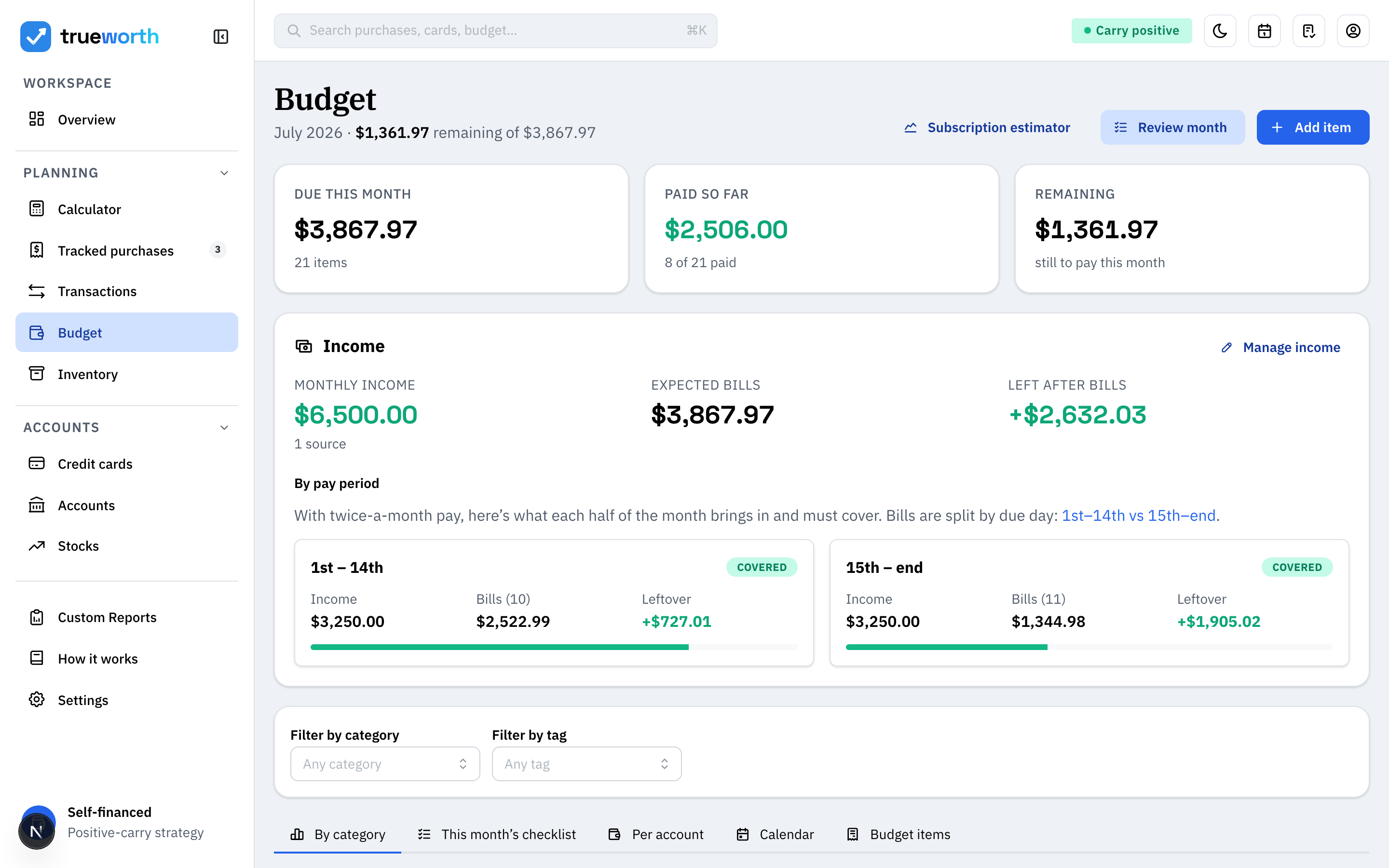
Image 1 of 4
Budgeting has been generally a frustrating endeavor for me. My best attempt at wrangling my budget was to use Excel to build complicated tables and do my best to stay on top of it. But one bad day, or one bad week, and I’d fall so far behind I couldn’t catch up.
I’ve tried automated tools that fetch and categorize all of my data. Typically, they categorized them wrong, made assumptions, or double/triple counted certain transactions when I used Paypal. I’m sure I’m not the only one that somehow had 2 different Netflix subscriptions because I paid Netflix with Paypal and Paypal with a card and that showed up as two separate Netflix payments.
I got frustrated with the situation and built my own tracker – simplified to what I need and giving me the stats that I need. And, very importantly, running the way my life runs.
The budget is bills, not categories of spending. Every recurring obligation with its cadence and due day, split across the two halves of the month because that’s how I get paid. This allows me to see if my bills are properly balanced between the two halves of the month. Originally, I also wanted the calculator to tell me how much I need to carry from one part of the month to the next to properly pay for each bill. I can still add that if I want.
The credit card tracker is a debt tracker with a payoff planner attached. Balances, APRs, minimum payments, monthly and yearly carrying cost, and a chart that will re-sort the same cards by debt, by interest, or by utilization depending on which question I’m asking. Every card together, one number for what the debt actually costs to hold. Plus, a calendar to see everything.
It was an illuminating experience just comparing how difficult it was to get the APR for each card – Citi cards had that info in the app itself. Chase required me to dig through long unsearchable statements to find that value.
The inventory is the piece with no vendor equivalent at all. It’s a list of physical assets I own and use – laptop, phone, mattress, dishwasher, water heater – each with what it cost, when I got it, and how long it should last. From that, TrueWorth derives the only number I actually wanted: cost per month over its useful life. A $1,700 dishwasher on a twelve-year clock is $11.81 a month. It put spending and purchases in a completely different perspective for me. A 2-year mattress for $1000 costs $42/month. A 5-year $3000 mattress $50/month – so the mattress I agonized over is four times the monthly cost of the appliance I bought without blinking.
These are features that you’d find in inventory systems, or business-grade accounting software. Or, your own app that you build.
I included all kinds of calculations I wanted to keep track of that didn’t exist elsewhere such as:
- investing projections
- change in monthly interest fees based on paying off cards
- subscription calculators (comparing yearly subscription purchase vs. paying monthly but investing the rest of the money upfront in a stock)
- custom reports on stock performance over the past 30 years compared to inflation
There’s an in-app /docs section explaining how each derived number is computed, formulas rendered in KaTeX with the values plugged in. Some of this data is already inline as well so I can double-check the math is right. This is crucial especially when things don’t seem to “make sense” at first look.
TruePlay – the backlog, priced by the hour
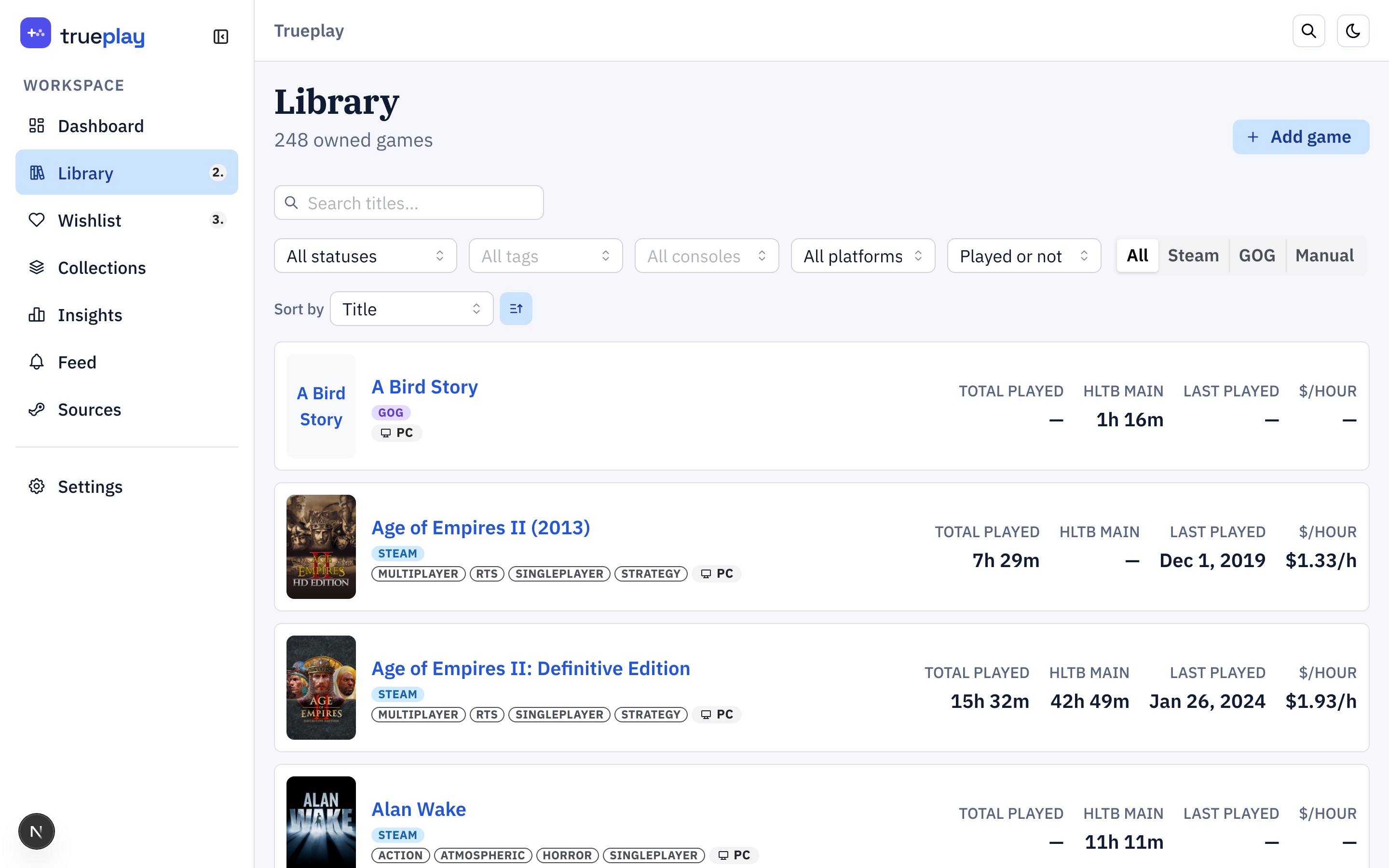
Image 1 of 3
While this could have been folded into TrueMedia, I wanted a specific backlog tracker as well as a general game tracker. What I got out of it was a lot more than that. Through Steam sync, I got every single Steam game, its playtime, and other data synced to my local system. Did the same thing with GoG. And also allowed manually entry for consoles since Nintendo doesn’t have an open API to fetch all the games I own. Plus, I own a lot of physical media, can’t have an API for that.
But not only did I grab every single game, through Claude, I found out I can sync all of the wishlists which meant that I had one large library of:
- games I’ve played
- games I own but have never played
- games I want
- games I’m playing
Through IsThereAnyDeal and HowLongToBeat, I was able to also retrieve data on how long games take to beat and their price history.
Joining those gives you something none of the sources have on their own: cost per hour. That’s the $/HOUR column above. A game you paid $60 for and played 176 hours cost you thirty-four cents an hour. One you paid $20 for and bounced off after eleven cost you nearly two dollars an hour. These tradeoffs are fine. Entertainment isn’t about cost-per-hour-maxxing but it does put things into perspective. 200 hours in No Man’s Sky entirely justifies the $30 cost. 2 hours playing “A Bird Story” that cost $5 on a GoG sale may seem like a lot in comparison, but that game stuck with me.
You know what’s also fun to see? What games you own that have a 2-3 hour HLTB that you’ve never played.
Nobody joins these two datasets. The deal sites know prices but not your library. Steam knows your library but doesn’t care what you paid for a key you bought somewhere else. The backlog trackers know neither. And it isn’t a technical problem – these APIs are free and I wired them together in an evening. The join just needs your purchase history and your playtime in the same database, and no company gets both without asking you to hand over both.
I didn’t have to ask myself for permission. Private data plus public APIs gets you numbers that nobody can sell you.
So how do I use it? I legit just keep track of games I started and I’m taking a break from. It’s also the best and easiest and fastest lookup for deals, the estimated game play time, and the easiest way to bookmark games – across all platforms.
TrueHouse – the household’s institutional memory
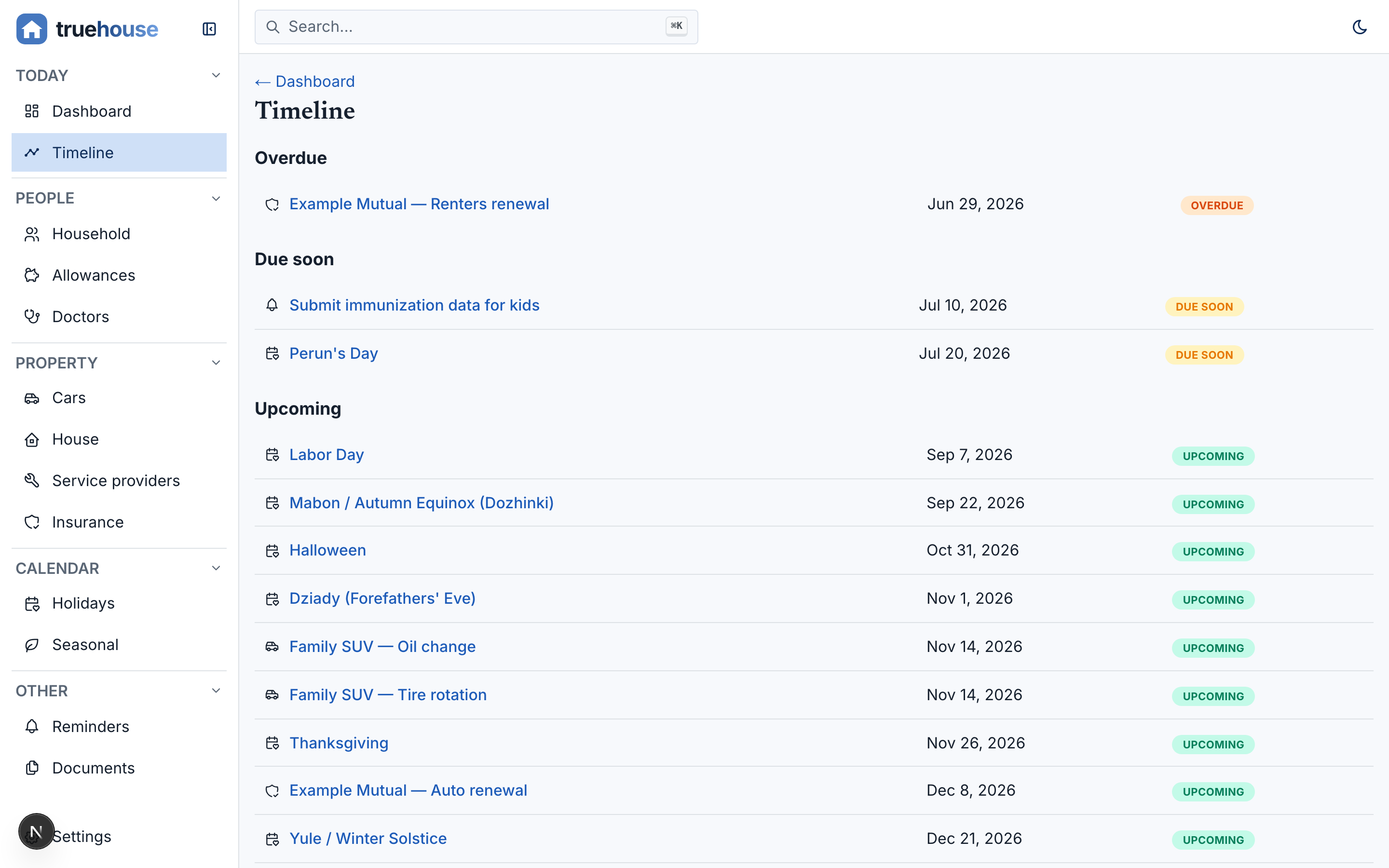
Image 1 of 4
This app started more as a “joke”. You see, after TrueWorth, TrueMedia, and TruePlay, I kind of got addicted to make these one-off local me-first apps. I thought about how these apps are essentially CRUD applications with derived data and a nice UI.
That took me to build a “Household manager”.
Cars, house maintenance, doctors, insurance policies, service providers, kids’ allowances, recurring holidays and the traditions attached to the same app and being able to go through these made this app amazing.
All of this data was scattered across Obsidian, password managers, or not captured at all and honestly, it’s been detrimental. Think about how long it takes you to find your health insurance info (find wallet -> open wallet -> try to find the card -> try to find the right data on it) or if someone asked you what windshield wipers you need for your car (I’d just google it and get it wrong).
This started as a joke for me because I wanted an excuse to utilize my newly-built skill but now, I’m using it to track doctors’ appointment, maintenance schedules on my house and car, and kids’ allowances. I used to keep allowances in a note on my iPhone and that was it. Just had to remember to increment/decrement it once in a while.
The commercial answer to TrueHouse is three subscriptions: a car maintenance app, a home maintenance app, and a family organizer. Each one is a silo, each one is cloud-hosted, each one wants my house’s address and my kids’ names on someone else’s server. Each one barely does what I need it to. Trust me, I’ve watched all of the YouTube reviews on these products. They’re fine…but they’re not great.
And here’s what gets me. The only reason those are three products is that they’re three markets. There’s nothing about a car, a dentist appointment, and a Christmas tradition that wants them in separate databases – they’re separate because they were sold separately. My /timeline page merges everything overdue, due soon, and upcoming into one list. It was never hard to build it, it was just never worth anyone’s while.
TrueHouse enriches from free, keyless government data – NHTSA for VIN decoding and recalls (YEAH, did you know you can look up recalls by VIN???), the EPA for fuel economy. It’s the most built-out of the seven: 74 screens.
For smaller things like holidays, I keep a track of our traditions and reminders. For example, I like to take my kids on holiday train rides in the winter. I almost always remember to buy the tickets in late November when those tickets are already expensive and many days are sold out. This keeps it much easier to keep in mind and less messy than having a complicated Google Calendar.
The other four, quickly
TrueMedia is one library over anime, movies, TV, and books, pulling metadata from AniList, TVmaze, Open Library, and OMDb. I was a huge fan of Goodreads when it first came out and used it to track my reading for over a decade. I got locked out of that account permanently which means I lost my entire library and history. I did the same thing with AniDB to track the anime I watched but at some point, just like with budgeting, I’d slip, forget, and never come back to it. Now it’s a SQLite file that I own. The best part isn’t the tracking though, it’s the channel guide – it takes the things in my library and fabricates a cable TV schedule out of them. Five fake channels, a scrolling fourteen-day grid, the whole Comcast-guide aesthetic. I have trouble picking what to watch and I start way too much content concurrently, so being told what’s on fixes an indecision problem that appears in exactly zero product requirement documents.
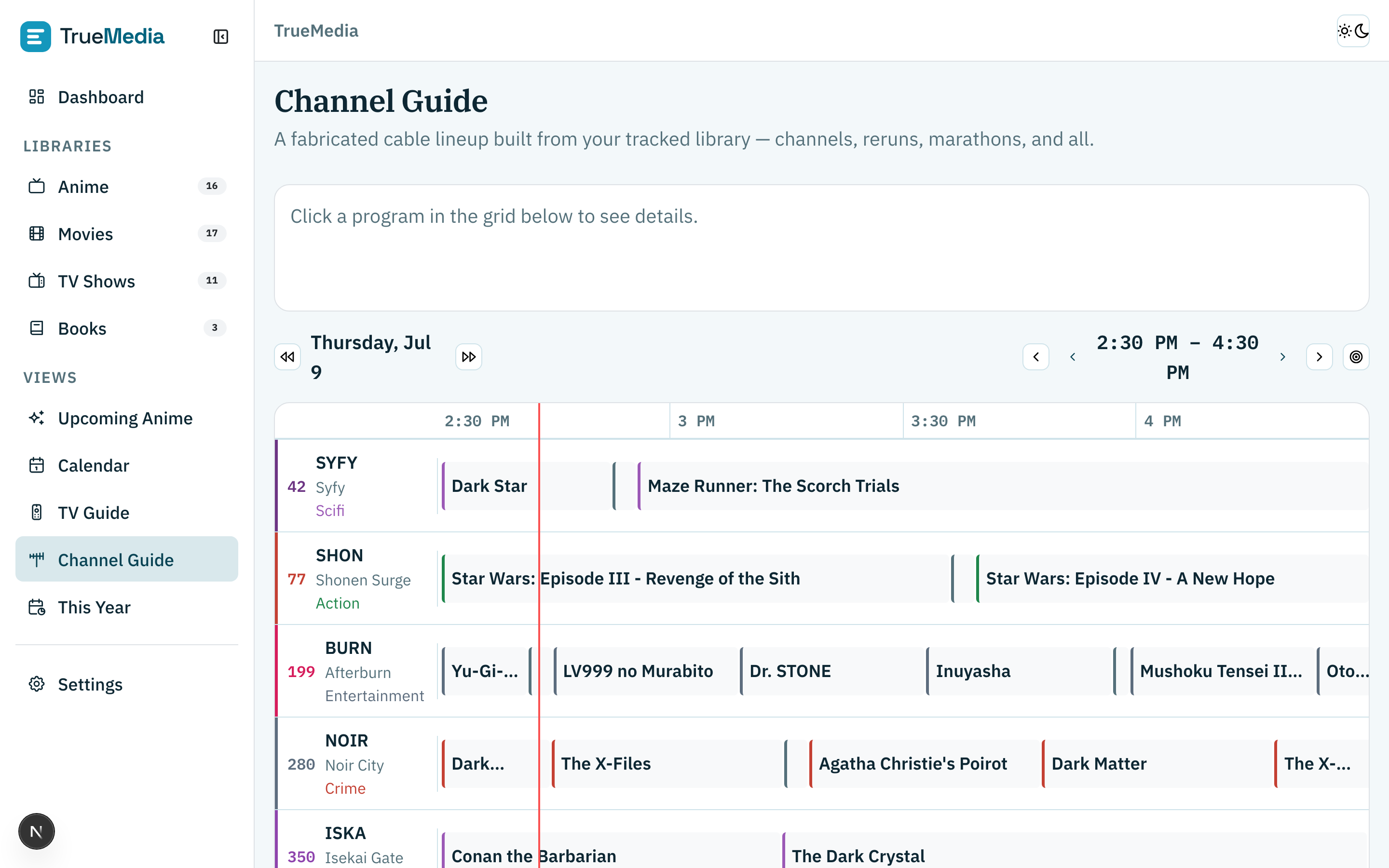
Image 1 of 4
TrueJob tracks jobs, not just job applications. You see, whenever performance reviews come up, I feel like every one of my colleagues (no matter the job) starts to panic because no one remembers what they’ve worked on in the past year. I typically dealt with this by having a note called ”_ACCUMULATOR.md” inside of Obsidian and dumping wins into it. Last time I did a performance review, my manager was ecstatic that I had a whole list ready right away – screenshots of messages, metrics, all of it. TrueJob carries those achievements across jobs so they don’t die with the Obsidian vault. It’s also got a lesson player bolted onto it, because I ported the core of an interactive LMS I’d built previously, so I can point Claude at a topic, have it deep-research and cite everything, and get back a lesson plan I can actually click through.
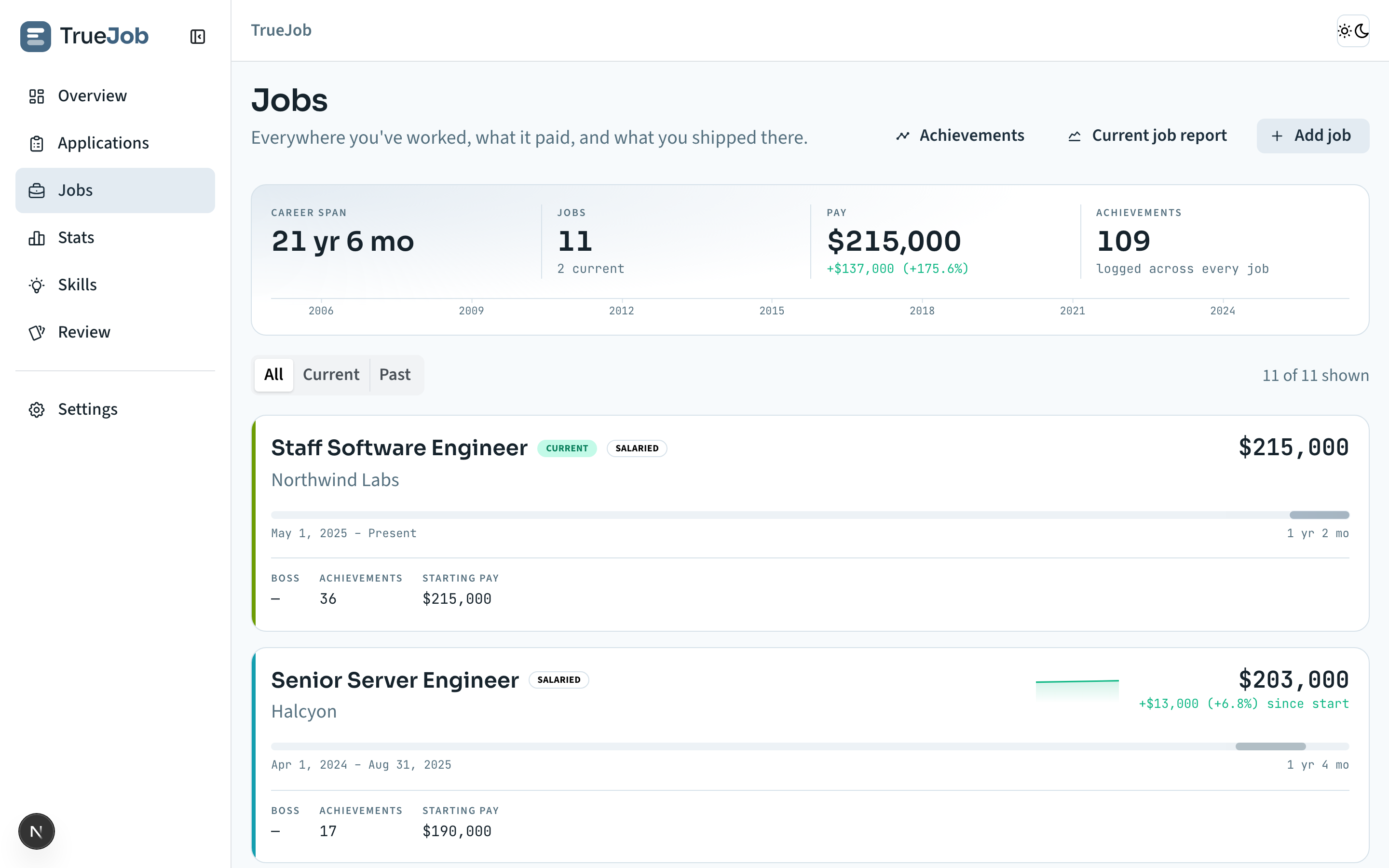
Image 1 of 4
TrueDex is a Pokédex for the game I’m playing right now. I was playing Pokemon Z-A with my daughter and we kept a laptop next to us to look up type matchups and evolution levels all night. I love Bulbapedia but it hides the information I want, because it’s built for the public and most hardcore players already remember the basics. TrueDex filters the dex down to the current playthrough, does team building with IV/EV and nature calcs, and themes itself after whichever game I’m playing so I can tell at a glance that I’m looking at Violet data during a Z-A run. It seeds from PokéAPI once – the only app in the suite that touches the network at all – and then runs entirely offline on 54 MB of sprites sitting on disk.
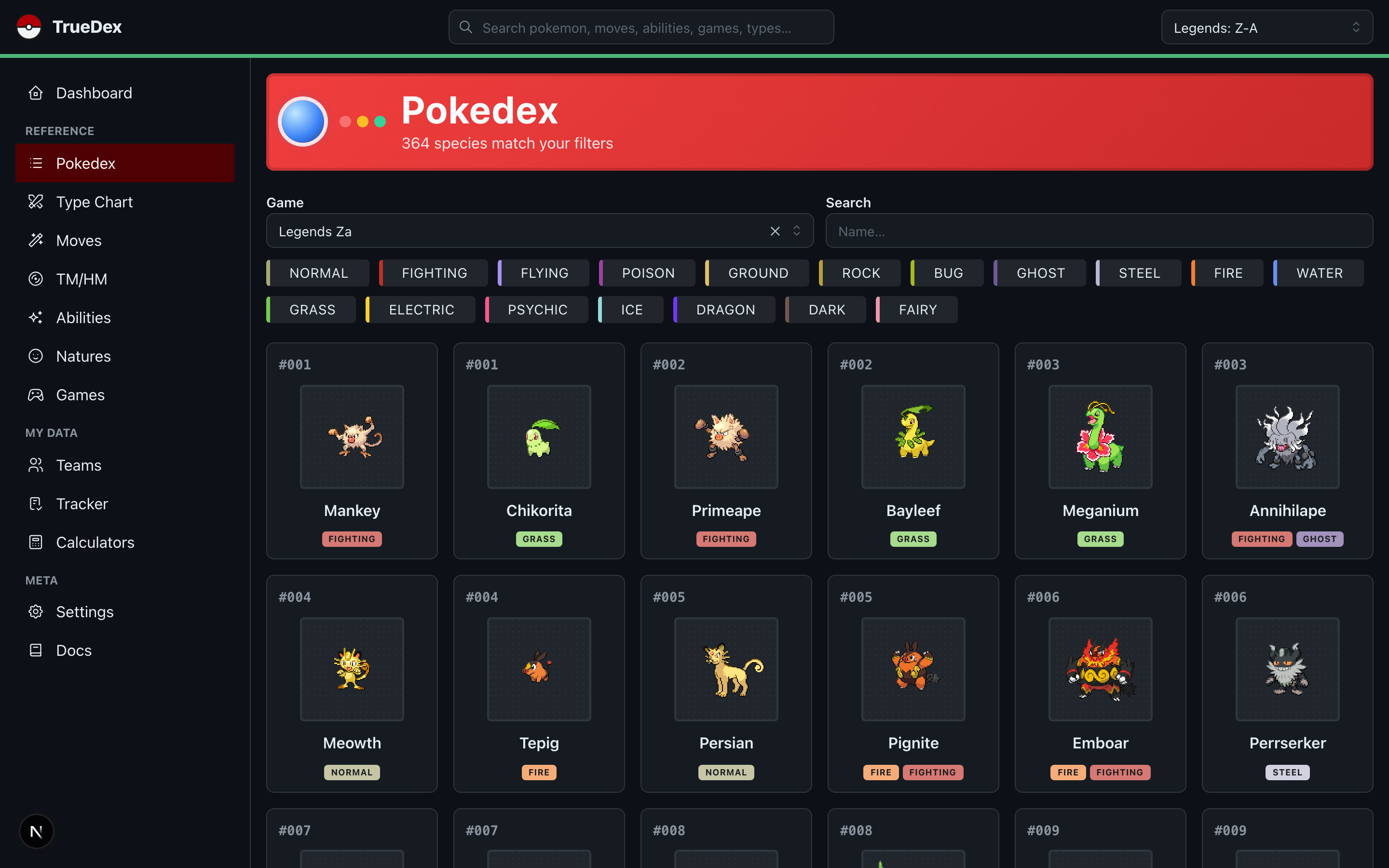
Image 1 of 3
TrueApps is the hub. After the first four it just made sense to build a container to run the others and connect them, so it grew a unified calendar and a widget board, and it doesn’t just link out to the apps – it runs them inside its own tabbing system. It compiles into a native executable I can drag onto any machine.
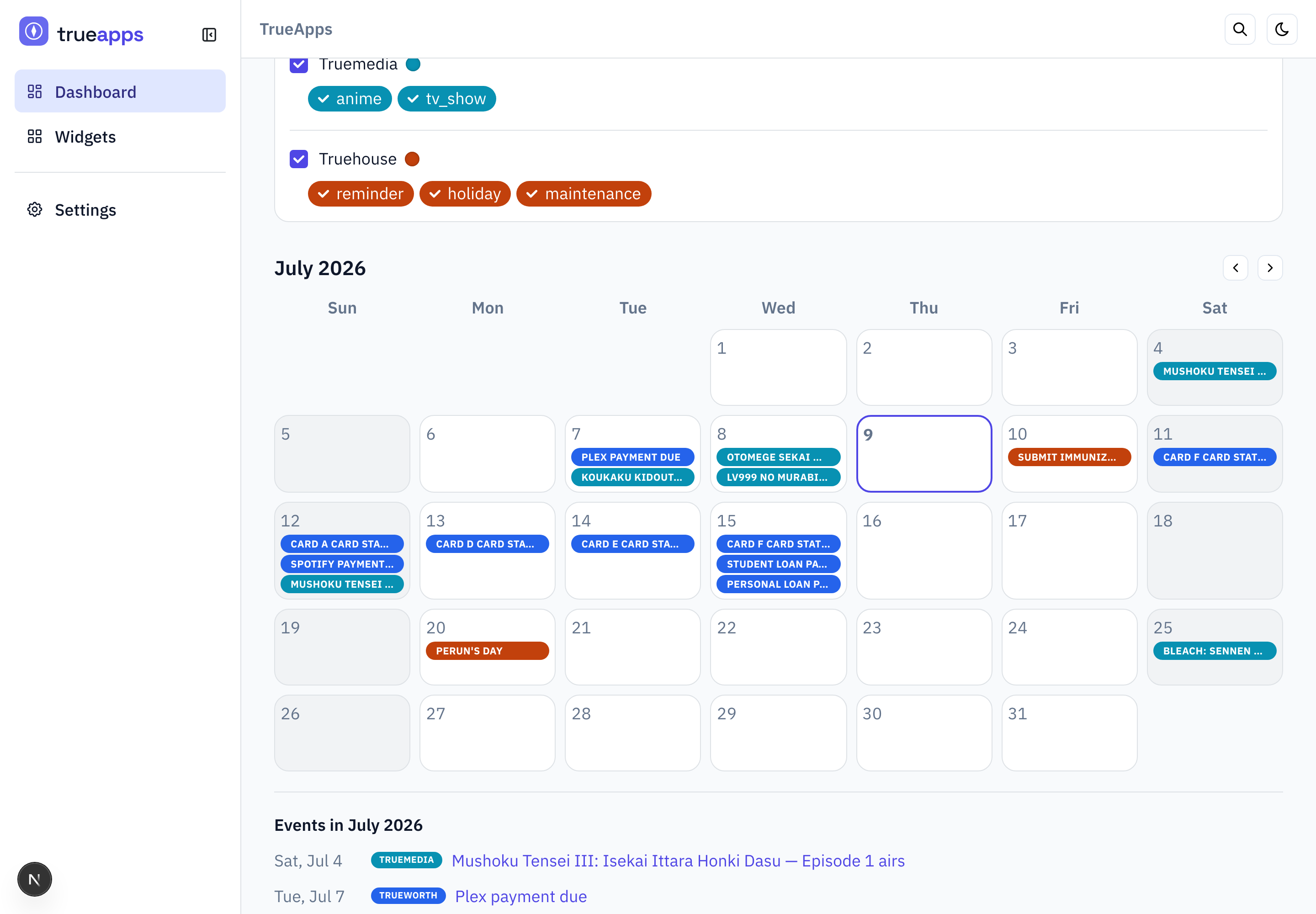
Image 1 of 2
It’s also a decent picture of how unfinished this all is:
TruePlay exposes a calendar endpoint that has never once returned a single event. TrueJob and TrueDex don’t have the endpoint at all. Nobody’s filing a bug. It’s fine.
Copy and modify
Building a Pokedex app isn’t something new. TrueDex is Bulbapedia with the parts I don’t use taken out. TrueMedia is Goodreads and MyAnimeList mashed together. TrueHouse is three SaaS products I refused to pay for. None of them are original ideas, and that’s not a knock – that’s the mechanism.
We’re at a point where instead of forking a repo, we fork a “concept” and make it our own. The implementation used to be the expensive part. Now it’s the cheap part. You don’t need a novel idea, you need an existing one and a very specific opinion about what’s wrong with it.
Which means the scarce skill moves. I didn’t write TrueHouse, I specified it. Knowing exactly what you want, in enough detail that something else can go build it – that’s a product skill, and it used to be a job title. It’s why I keep watching the “Technical Product Manager” role quietly proliferate at every company I’ve worked at.
But the technical expertise didn’t become optional. I made real architectural calls on every one of these – SQLite over a hosted DB, a pure logic core, what to derive versus what to store. When Claude went sideways, I knew why. Someone without that background gets a working app and no idea which parts are load-bearing.
So it’s both. Technical expertise is the floor. Product expertise – actually knowing what you want – is suddenly worth just as much, and it’s the half most engineers have spent their careers outsourcing to somebody else.
What I imagine for the future of apps
My real dream is taking this entire idea several steps further. Most of the really surface “apps” are either a sophisticated and well-connected chatbot or a normal application with a sidebar pullout for an AI chat that’s aware of what you’re doing on the page.
The next step in that progression (that hasn’t taken off yet) are MCP Apps which allow you to embed an application view inside of a chat. I love that idea, I think it’d be great to use an actual view of the application I want to use and have my AI interact with it alongside me.
But let’s take it even further, what about made-to-order applications? Not just views or an HTML report but true AI-powered apps built on the fly?
I wrote a book years ago (never published) where I imagined traversing across information streams and, essentially, the internet by creating custom UIs on the fly that brought you closer to what you’re used to and jumpstarting your ability to explore new areas of the web. Kind of like a holodeck where you interact with data however you want to.
Just imagine trying to learn about garden plants before seeding them and doing so in a virtual garden – like a job simulator. Or trying to wrap your head around calculus with interactive graphics that show you how the equations work. How about learning about animal migratory patterns through an RTS game? And if it doesn’t suit you, just ask for something else.
What if that was the future? Instead of chatting with an AI that can embed apps (not always optimal) or using rigid existing apps…and chatting with an AI to help you find some link or page, you could actually chat with an AI while it’s actively building the app that helps you understand data, or interact with data, or whatever, on the fly.
Some imaginative examples
So, the apps I built aren’t entirely breath-taking and they’re not supposed to be. They work for me, I chose the palettes, I chose the UI design, and, most importantly, I chose the UX. They’re apps made for me.
I decided to generate some ideas with ChatGPT and realized just how much I miss the look of kids encyclopedias, pop-up books, and skeuomorphism to the point of realism. I thought to myself, how fun would it be to order food but decide that you’d like to “build” it in a hyper-realistic app? What if I wanted to sort photos but wanted to be able to easily go through them and tag them one by one from a stack of polaroids? What if I could learn about flowers from a picturesque kids’ book garden UI? (You know, when it’s too hot out to go out IRL).
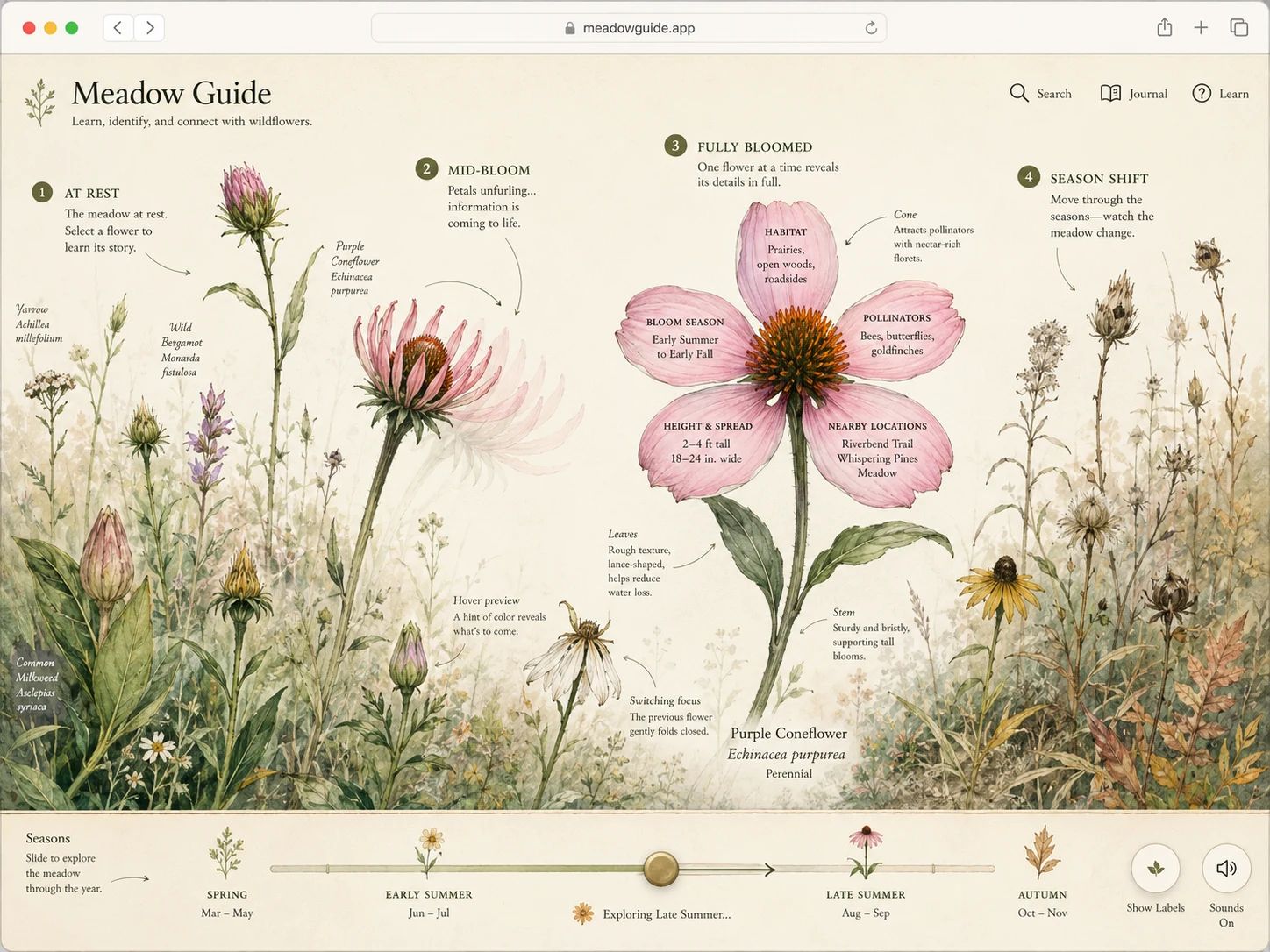
The Wildflower Guide
Bloom. Pick a flower and it opens -- and the petals themselves carry the facts: habitat, season, pollinators, height.
Image 1 of 10